 |
Code Documentation 3.8
Social Network Visualizer
|
|
Code Documentation 3.8
Social Network Visualizer
|
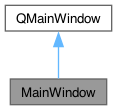
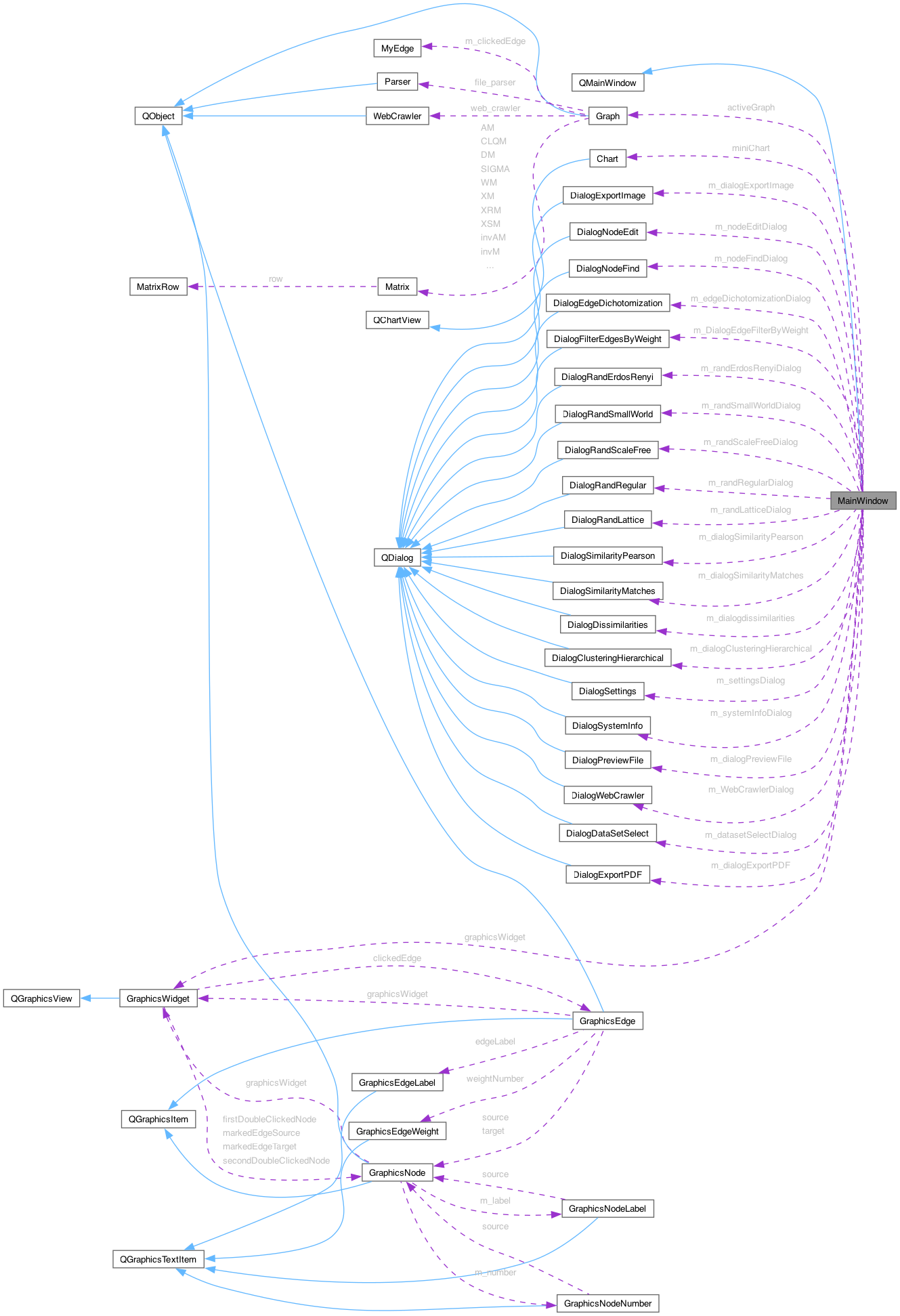
The base window of SocNetV contains all widgets and functionality. More...
#include <mainwindow.h>
Public Slots | |
| void | slotNetworkNew () |
| Starts a new network (closing the current one). | |
| void | slotNetworkFileChoose (QString m_fileName=QString(), int fileFormat=-1, const bool &checkSelectFileType=true) |
| Chooses a network file to load. | |
| void | slotNetworkFileDialogFileSelected (const QString &fileName) |
| Called when user selects a file in the fileDialog Calls slotNetworkFileChoose() again. | |
| void | slotNetworkFileDialogFilterSelected (const QString &filter) |
| Called when user the selects a file filter (i.e. GraphML) in the fileDialog. | |
| void | slotNetworkFileDialogRejected () |
| Displays a status message when the user aborts the file dialog. | |
| void | slotNetworkFileRecentUpdateActions () |
| Updates the Recent Files QActions in the menu. | |
| bool | slotNetworkFilePreview (const QString &, const int &) |
| Opens the preview dialog with the selected file contents. | |
| void | slotNetworkFileLoad (const QString &fileNameToLoad, const QString &codeName, const int &fileFormat) |
| Loads the given network file. | |
| void | slotNetworkFileLoaded (const int &type, const QString &fName=QString(), const QString &netName=QString(), const int &totalNodes=0, const int &totalEdges=0, const qreal &density=0, const qint64 &elapsedTime=0, const QString &message=QString()) |
| Informs the user (and the MW) about the type of the network loaded. | |
| void | slotNetworkFileLoadRecent () |
| Loads a selected file entry from the "Recent Files" menu. | |
| void | slotNetworkSavedStatus (const int &status) |
| Updates the 'save' status of the network. | |
| void | slotNetworkFileView () |
| Displays the file of the loaded network. | |
| void | slotNetworkImportGraphML () |
| Imports a network from a GraphML formatted file. | |
| void | slotNetworkImportPajek () |
| Imports a network from a Pajek-like formatted file. | |
| void | slotNetworkImportAdjacency () |
| Imports a network from a Adjacency matrix formatted file. | |
| void | slotNetworkImportGraphviz () |
| Imports a network from a Dot (GraphViz) formatted file. | |
| void | slotNetworkImportGML () |
| Imports a network from a GML formatted file. | |
| void | slotNetworkImportUcinet () |
| Imports a network from a UCINET formatted file. | |
| void | slotNetworkImportEdgeList () |
| Imports a network from a simple List or weighted List formatted file. | |
| void | slotNetworkImportTwoModeSM () |
| Imports a network from a two mode sociomatrix formatted file. | |
| void | slotNetworkChanged (const bool &directed, const int &vertices, const int &edges, const qreal &density, const bool &needsSaving=true) |
| Refreshes LCD values and toggles the networkSave icon, when the network has been modified. | |
| void | slotNetworkSave (const int &fileFormat=-1) |
| Saves the network to a file. | |
| void | slotNetworkSaveAs () |
| Prompts the user to save the network in a new file. Always uses the GraphML format and extension. | |
| bool | slotNetworkClose () |
| Closes the current network, saving it if needed. | |
| void | slotNetworkPrint () |
| Sends the active network to the printer. | |
| void | slotNetworkViewSociomatrix () |
| Displays the adjacency matrix of the network. | |
| void | slotNetworkViewSociomatrixPlotText () |
| Displays a text-only plot of the network adjacency matrix. | |
| void | slotNetworkExportImageDialog () |
| Opens the Export to Image Dialog. | |
| void | slotNetworkExportImage (const QString &filename, const QByteArray &format, const int &quality, const int &compression) |
| Exports the network to an image file. | |
| void | slotNetworkExportPDFDialog () |
| Opens the Export to PDF Dialog. | |
| void | slotNetworkExportPDF (QString &pdfName, const QPageLayout::Orientation &orientation, const int &dpi, const QPrinter::PrinterMode printerMode, const QPageSize &pageSize) |
| Exports the visible part of the network to a PDF Document. | |
| void | slotNetworkExportPajek () |
| Exports the network to a Pajek-formatted file Calls the relevant Graph method. | |
| void | slotNetworkExportSM () |
| Exports the network to an adjacency matrix-formatted file Calls the relevant Graph method. | |
| void | slotNetworkExportDot () |
| Exports the active relation to a GraphViz DOT (.dot) file. | |
| bool | slotNetworkExportDL () |
| Exports the current graph to a UCINET DL-formatted file. | |
| bool | slotNetworkExportGW () |
| bool | slotNetworkExportList () |
| Exports the active relation to a simple or weighted edge list file. | |
| void | slotNetworkExportNodesCSV () |
| Exports all node data (unfiltered) to a CSV file chosen by the user. | |
| void | slotNetworkExportEdgesCSV () |
| Exports all edge data (unfiltered) to a CSV file chosen by the user. | |
| void | slotNetworkExportNodesJSON () |
| Exports all node data (unfiltered) to a JSON file chosen by the user. | |
| void | slotNetworkExportEdgesJSON () |
| Exports all edge data (unfiltered) to a JSON file chosen by the user. | |
| void | slotNetworkTextEditor () |
| Opens the embedded text editor. | |
| void | slotNetworkDataSetSelect () |
| Displays the dataset selection dialog. | |
| void | slotNetworkDataSetRecreate (const QString) |
| Recreates famous and widely used data sets in network analysis studies. | |
| void | slotNetworkRandomErdosRenyiDialog () |
| Shows a dialog to create an Erdos-Renyi random network. | |
| void | slotNetworkRandomErdosRenyi (const int N, const QString model, const int edges, const qreal eprob, const QString mode, const bool diag) |
| Creates an Erdos-Renyi random symmetric network. | |
| void | slotNetworkRandomRegularDialog () |
| Shows a dialog to create a d-regular random network. | |
| void | slotNetworkRandomRegular (const int &newNodes, const int °ree, const QString &mode, const bool &diag) |
| Creates a pseudo-random d-regular network where every node has the same degree. | |
| void | slotNetworkRandomGaussian () |
| void | slotNetworkRandomScaleFreeDialog () |
| Shows a dialog to create a scale-free random network. | |
| void | slotNetworkRandomScaleFree (const int &newNodes, const int &power, const int &initialNodes, const int &edgesPerStep, const qreal &zeroAppeal, const QString &mode) |
| Creates a scale-free random network. | |
| void | slotNetworkRandomSmallWorldDialog () |
| Shows a dialog to create a small-world random network. | |
| void | slotNetworkRandomSmallWorld (const int &newNodes, const int °ree, const qreal &beta, const QString &mode, const bool &diag) |
| Creates a small-world random network. | |
| void | slotNetworkRandomRingLattice () |
| Creates a ring lattice network. | |
| void | slotNetworkRandomLatticeDialog () |
| Shows a dialog to create a "random" lattice network. | |
| void | slotNetworkRandomLattice (const int &newNodes, const int &length, const int &dimension, const int &nei, const QString &mode, const bool &circular) |
| Creates a 'random' lattice network, i.e. a connected network where every node has the same degree and is connected with its neighborhood. | |
| void | slotNetworkWebCrawlerDialog () |
| Shows the web crawler dialog. | |
| void | slotNetworkWebCrawler (const QUrl &startUrl, const QStringList &urlPatternsIncluded, const QStringList &urlPatternsExcluded, const QStringList &linkClasses, const int &maxNodes, const int &maxLinksPerPage, const bool &intLinks, const bool &childLinks, const bool &parentLinks, const bool &selfLinks, const bool &extLinks, const bool &extLinksCrawl, const bool &socialLinks, const bool &delayedRequests) |
| Starts the web crawler with the user options. | |
| void | slotNetworkManagerRequest (const QUrl &url, const NetworkRequestType &requestType) |
| Makes a network request to the given url. | |
| void | slotEditDragModeSelection (bool) |
| Toggles the interactive/selection mouse drag mode. | |
| void | slotEditDragModeScroll (bool) |
| Toggles the non-interactive scrollhand drag mode. | |
| void | slotEditRelationsClear () |
| Clears the relations combo. | |
| void | slotEditRelationAddPrompt () |
| Prompts the user to enter the name of a new relation. | |
| void | slotEditRelationAdd (const QString &newRelationName) |
| Adds a new relation to the relations combo. | |
| void | slotEditRelationChange (const int &relIndex=RAND_MAX) |
| Changes the editRelations combo box index to relIndex. | |
| void | slotEditRelationRename () |
| Prompts the user to enter a new name for the current relation. | |
| void | slotEditOpenContextMenu (const QPointF &mPos) |
| Shows a context menu when the user right-clicks on an empty area of the canvas (i.e. not directly on a node or edge). | |
| void | slotEditSelectionChanged (const int &selNodes, const int &selEdges) |
| Updates the UI (LCDs and Actions) after a change in the user-selected nodes/edges. | |
| void | slotEditNodeSelectAll () |
| Selects all nodes. | |
| void | slotEditNodeSelectNone () |
| Selects no nodes. | |
| void | slotEditNodeInfoStatusBar (const int &number, const QPointF &p, const QString &label, const int &inDegree, const int &outDegree) |
| Displays information about the given node on the statusbar. | |
| void | slotEditNodePosition (const int &nodeNumber, const int &x, const int &y) |
| Automatically runs, when the user moves a node on the canvas, to update new vertex coordinates in Graph, and show a status message. | |
| void | slotEditNodeAdd () |
| Adds a new random node. | |
| void | slotEditNodeFindDialog () |
| Opens the Find Node dialog. | |
| void | slotEditNodeFind (const QStringList &nodeList, const QString &searchType, const QString &indexStr=QString()) |
| Finds one or more nodes, according to their number, label or centrality score. | |
| void | slotEditNodeRemove () |
| Handles requests to delete a node and the attached objects (edges, etc). | |
| void | slotEditNodeOpenContextMenu () |
| Shows a context menu when the user right-clicks directly on a node. | |
| void | slotEditNodePropertiesDialog () |
| Opens the Node Properties dialog for the selected nodes. If no nodes are selected, prompts the user for a node number. | |
| void | slotCacheSelection (const QList< int > &nodes, const QList< SelectedEdge > &edges) |
| Syncs the Data Table selection to match the canvas selection. | |
| void | slotEditNodeEditSelectionInTable () |
| Raises the Data Table dock and pre-selects rows matching the current canvas selection. | |
| void | slotEditNodeSetPropertyForSelection () |
| Opens DialogBulkEdit for the currently selected nodes (canvas shortcut). | |
| void | slotEditEdgeSetPropertyForSelection () |
| Opens DialogBulkEdit for the currently selected edges (canvas shortcut). | |
| void | slotEditNodeProperties (const QString &label, const int &size, const QColor &color, const QString &shape, const QString &iconPath, const QHash< QString, QString > &customAttributes) |
| Applies the selected properties to one or multiple nodes in the graph. | |
| void | slotEditNodeSelectedToClique () |
| Creates a complete subgraph (clique) from selected nodes. | |
| void | slotEditNodeSelectedToStar () |
| Creates a star subgraph from selected nodes. User must choose a central node. | |
| void | slotEditNodeSelectedToCycle () |
| Creates a cycle subgraph from selected nodes. | |
| void | slotEditNodeSelectedToLine () |
| Creates a line subgraph from selected nodes. | |
| void | slotEditNodeColorAll (QColor color=QColor()) |
| Changes the color of all nodes to parameter color. | |
| void | slotEditNodeSizeAll (int newSize=0, const bool &normalized=false) |
| Changes the size of nodes to newSize. | |
| void | slotEditNodeShape (const int &vertex=0, QString shape=QString(), QString nodeIconPath=QString()) |
| Change the shape of a node or all nodes. If shape == null, prompts the user a list of available node shapes to select. Then changes the shape of all nodes/vertices accordingly. If vertex is non-zero, changes the shape of that node only. Called when user clicks on Edit->Node > Change all nodes shapes Called from DialogSettings when the user has selected a new default node shape. | |
| void | slotEditNodeNumberSize (int v1=0, int newSize=0, const bool prompt=true) |
| Changes the size of one or all node numbers. Called from Edit menu option and DialogSettings if newSize=0, asks the user to enter a new node number font size if v1=0, it changes all node numbers. | |
| void | slotEditNodeNumberDistance (int v1=0, int newSize=0) |
| Changes the distance of one or all node numbers from their nodes. Called from Edit menu option and DialogSettings if newDistance=0, asks the user to enter a new node number distance if v1=0, it changes all node number distances. | |
| void | slotEditNodeNumbersColor (const int &v1=0, QColor color=QColor()) |
| Changes the text color of all node numbers Called from Edit menu option and Settings dialog. If color is invalid, asks the user to enter a new node number color. | |
| void | slotEditNodeLabelSize (const int v1=0, int newSize=0) |
| Changes the size of one or all node Labels. Called from Edit menu option and DialogSettings if newSize=0, asks the user to enter a new node Label font size if v1=0, it changes all node Labels. | |
| void | slotEditNodeLabelsColor (QColor color=QColor()) |
| Changes the color of all node labels. Asks the user to enter a new node label color. | |
| void | slotEditNodeLabelDistance (int v1=0, int newSize=0) |
| MainWindow::slotEditNodeLabelDistance Changes the distance of one or all node label from their nodes. Called from Edit menu option and DialogSettings if newDistance=0, asks the user to enter a new node label distance if v1=0, it changes all node label distances. | |
| void | slotEditEdgeClicked (const MyEdge &edge=MyEdge(), const bool &openMenu=false) |
| Displays information about the clicked edge on the statusbar. | |
| void | slotEditEdgeOpenContextMenu (const QString &str="") |
| Shows a context menu when the user right-clicks directly on an edge. | |
| void | slotEditEdgeAdd () |
| Opens dialogs for the user to specify the source and the target node of a new edge. | |
| void | slotEditEdgeCreate (const int &source, const int &target, const qreal &weight=1) |
| Handles UI requests to create new edges, when the user clicks the menu item or doubles-clicks two nodes. | |
| void | slotEditEdgeRemove () |
| Removes a clicked edge. Otherwise asks the user to specify one edge. | |
| void | slotEditEdgePropertiesDialog () |
| Opens the Edge Properties dialog for the currently clicked edge. | |
| void | slotEditEdgeProperties (const int &v1, const int &v2, const QString &label, const double &weight, const QColor &color, const QHash< QString, QString > &customAttributes) |
| Applies updated edge properties received from DialogEdgeEdit. | |
| void | slotEditEdgeLabel () |
| Changes the label of an edge. | |
| void | slotEditEdgeColor () |
| Changes the color of the clicked edge. If no edge is clicked, then it asks the user to specify one. | |
| void | slotEditEdgeWeight () |
| Changes the weight of the clicked edge. If no edge is clicked, asks the user to specify an Edge. | |
| void | slotEditEdgeColorAll (QColor color=QColor(), const int threshold=RAND_MAX) |
| Changes the color of all edges weighted below threshold to parameter color. | |
| void | slotEditEdgeMode (const int &mode) |
| Toggles between directed (mode=0) and undirected edges (mode=1). | |
| void | slotEditGraphDirectedChanged (const bool &directed) |
| Updates the edge-mode combo and arrows action to reflect the directed state of the newly selected relation, without calling setDirected/setUndirected. | |
| void | slotEditEdgeSymmetrizeAll () |
| Symmetrizes the ties between every two connected nodes. If there is an arc from Node A to Node B, then a new arc from Node B to Node is created of the same weight. Thus, all arcs become reciprocal and the network becomes symmetric with a symmetric adjacency matrix. | |
| void | slotEditEdgeSymmetrizeStrongTies () |
| MainWindow::slotEditEdgeSymmetrizeStrongTies. | |
| void | slotEditEdgeSymmetrizeCocitation () |
| Adds a new cocitation symmetric relation to the network. | |
| void | slotEditEdgeUndirectedAll (const bool &toggle) |
| Transforms all directed arcs to undirected edges. The result is a undirected and symmetric network. | |
| void | slotEditEdgeDichotomizationDialog () |
| Opens up the edge dichotomization dialog. | |
| void | slotEditEdgeDichotomization (const qreal threshold) |
| Calls Graph::graphDichotomization() to create a new binary relation in a valued network using edge dichotomization according to threshold value. | |
| void | slotFilterNodesDialogByCentrality () |
| Shows a dialog where the user can specify criteria to filter nodes. | |
| void | slotEditFilterNodesIsolates (bool checked) |
| Toggles the status of all isolated vertices. | |
| void | slotFilterNodesByEgoNetwork () |
| Triggers ego network focus mode on the currently selected node. | |
| void | slotFilterNodesBySelection () |
| Focuses the view on the currently selected nodes and edges between them. | |
| void | slotFilterNodesByAttribute () |
| Opens the Filter By Attribute dialog and applies the chosen condition. | |
| void | slotFilterByQueryBuilder () |
| Opens the Query Builder dialog for multi-condition AND filtering. | |
| void | slotFilterNodesRestoreAll () |
| Restores all nodes hidden by the last filter. | |
| void | slotEditFilterEdgesByWeightDialog () |
| Shows a dialog where the user can specify how to filter edges by their weight. | |
| void | slotEditFilterEdgesReset () |
| Restores all edges hidden by the weight filter. | |
| void | slotEditFilterEdgesUnilateral (bool checked) |
| Toggles the status of all unilateral edges. | |
| void | slotEditSubgraphExtract () |
| Extracts the currently visible nodes and their inter-edges into an independent Graph object and saves it to a user-chosen file. | |
| void | slotEditSubgraphExtractFromSelection () |
| Extracts currently selected nodes and their inter-edges into an independent Graph object and saves it to a user-chosen file. | |
| void | saveSubgraphToFile (Graph *sub, const QString &subgraphName) |
Shows a format-selection save dialog for sub, writes the file, then deletes the graph object. | |
| void | slotEditTransformNodes2Edges () |
| void | slotLayoutRandom () |
| Calls Graph::layoutRandom to reposition all nodes on a random layout. | |
| void | slotLayoutRadialRandom () |
| Calls Graph::layoutRadialRandom to reposition all nodes on a radial layout randomly. | |
| void | slotLayoutEgoRadial () |
| Calls Graph::layoutEgoRadial. Resolves the ego vertex from the current selection (exactly one selected) or from the last-clicked vertex, whichever is available. | |
| void | slotLayoutRadialByProminenceIndex () |
| Runs when the user selects a radial layout menu option. | |
| void | slotLayoutRadialByProminenceIndex (QString prominenceIndexName) |
| Applies a radial layout on the social network, where each node is placed on concentric circles according to their index score. | |
| void | slotLayoutLevelByProminenceIndex () |
| Runs when the user selects a radial layout menu option. | |
| void | slotLayoutLevelByProminenceIndex (QString prominenceIndexName) |
| Applies a level layout on the social network, where each node is placed on different top-down levels according to their index score. | |
| void | slotLayoutNodeSizeByProminenceIndex () |
| Runs when the user selects a color layout menu option. | |
| void | slotLayoutNodeSizeByProminenceIndex (QString prominenceIndexName) |
| Applies a node size layout on the social network, where the size of each of node is analogous to their index score. | |
| void | slotLayoutNodeColorByProminenceIndex () |
| Runs when the user selects a color layout menu option. | |
| void | slotLayoutNodeColorByProminenceIndex (QString prominenceIndexName) |
| Applies a color layout on the social network. Changes the colors of all nodes according to their index score. | |
| void | slotLayoutNodeColorByComponent () |
| Colors nodes by their weakly connected component. | |
| void | slotLayoutSpringEmbedder () |
| Embed the Eades spring-gravitational model to the network. Called from menu or toolbox checkbox. | |
| void | slotLayoutFruchterman () |
| Calls Graph::layoutForceDirectedFruchtermanReingold to embed the Fruchterman-Reingold model of repelling-attracting forces to the network. Called from menu or toolbox. | |
| void | slotLayoutKamadaKawai () |
| Layouts the network according to the Kamada-Kawai FDP model. | |
| void | slotLayoutColorationStrongStructural () |
| void | slotLayoutColorationRegular () |
| void | slotLayoutGuides (const bool &toggle) |
| Shows or hides (clears) layout guides. | |
| void | askAboutEdgeWeights (const bool userTriggered=false) |
| If the network has weighted / valued edges, it asks the user if the app should consider weights or not. | |
| void | slotAnalyzeReciprocity () |
| void | slotAnalyzeSymmetryCheck () |
| void | slotAnalyzeMatrixAdjacencyInverse () |
| Writes the adjacency matrix inverse. | |
| void | slotAnalyzeMatrixAdjacencyTranspose () |
| Writes the transpose adjacency matrix. | |
| void | slotAnalyzeMatrixAdjacencyCocitation () |
| Writes the cocitation matrix. | |
| void | slotAnalyzeMatrixDegree () |
| Writes the degree matrix of the graph. | |
| void | slotAnalyzeMatrixLaplacian () |
| Writes the Laplacian matrix of the graph. | |
| void | slotAnalyzeClusteringCoefficient () |
| Calls Graph::writeClusteringCoefficient() to write Clustering Coefficients into a file, and displays it. | |
| void | slotAnalyzeMatrixDistances () |
| Invokes calculation of the matrix of geodesic distances for the loaded network, then displays it. | |
| void | slotAnalyzeMatrixGeodesics () |
| Invokes calculation of the geodedics matrix (the number of shortest paths between each pair of nodes in the loaded network), then displays it. | |
| void | slotAnalyzeDistance () |
| Handles requests to compute the graph/geodesic distance between two user-specified nodes. | |
| void | slotAnalyzeDistanceAverage () |
| Displays the average shortest path length (average graph distance). | |
| void | slotAnalyzeGeodesicDistribution () |
| Computes and displays the distribution of geodesic distances across all ordered pairs of connected nodes as an HTML report. | |
| void | slotAnalyzeDiameter () |
| Displays the network diameter (largest geodesic). | |
| void | slotAnalyzeEccentricity () |
| void | slotAnalyzeWalksLength () |
| void | slotAnalyzeWalksTotal () |
| Calculate and print the total number of walks of any length, between each pair of nodes. | |
| void | slotAnalyzeReachabilityMatrix () |
| void | slotAnalyzeConnectedness () |
| Reports the network connectedness. | |
| void | slotAnalyzeNodeConnectivity () |
| Handles requests to compute the local vertex connectivity between two user-specified nodes: the minimum number of other nodes that must be removed to disconnect them. | |
| void | slotAnalyzeConnectivity () |
| Handles requests to compute the network's overall vertex connectivity: the minimum, over every pair of nodes, of their local vertex connectivity. | |
| void | slotAnalyzeCentralityDegree () |
| void | slotAnalyzeCentralitySignedDegree () |
| void | slotAnalyzeCentralityPN () |
| void | slotAnalyzeCentralityCloseness () |
| void | slotAnalyzeCentralityClosenessIR () |
| MainWindow::slotAnalyzeCentralityClosenessIR Writes Centrality Closeness (based on Influence Range) indices into a file, then displays it. | |
| void | slotAnalyzeCentralityBetweenness () |
| void | slotAnalyzeCentralityInformation () |
| MainWindow::slotAnalyzeCentralityInformation Writes Informational Centralities into a file, then displays it. | |
| void | slotAnalyzeCentralityEigenvector () |
| Writes Eigenvector Centralities into a file, then displays it. | |
| void | slotAnalyzeCentralityStress () |
| MainWindow::slotAnalyzeCentralityStress Writes Stress Centralities into a file, then displays it. | |
| void | slotAnalyzeCentralityPower () |
| MainWindow::slotAnalyzeCentralityPower Writes Gil-Schmidt Power Centralities into a file, then displays it. | |
| void | slotAnalyzeCentralityEccentricity () |
| MainWindow::slotAnalyzeCentralityEccentricity Writes Eccentricity Centralities into a file, then displays it. | |
| void | slotAnalyzeCentralityKatz () |
| MainWindow::slotAnalyzeCentralityKatz Estimates the network's largest eigenvalue first, then prompts for the attenuation factor alpha (dialog shows/enforces the real convergence bound), then writes Katz Centralities into a file and displays it. | |
| void | slotAnalyzeCentralityBonacich () |
| MainWindow::slotAnalyzeCentralityBonacich Estimates the network's largest eigenvalue first, then prompts for the parameters alpha and beta (dialog shows/enforces the real convergence bound on beta), then writes Bonacich Power Centralities into a file and displays it. | |
| void | slotAnalyzePrestigeDegree () |
| void | slotAnalyzePrestigePageRank () |
| void | slotAnalyzePrestigeProximity () |
| MainWindow::slotAnalyzePrestigeProximity Writes Proximity Prestige indices into a file, then displays them. | |
| void | slotAnalyzeProminenceDistributionChartUpdate (QAbstractSeries *series, QAbstractAxis *axisX, const qreal &min, const qreal &max, QAbstractAxis *axisY=Q_NULLPTR, const qreal &minF=0, const qreal &maxF=0) |
| Updates the prominence distribution miniChart Called from Graph after computing the prominence index distribution. | |
| void | slotAnalyzeCommunitiesCliqueCensus () |
| Calls Graph:: writeCliqueCensus() to write the Clique Census into a file, then displays it. | |
| void | slotAnalyzeCommunitiesTriadCensus () |
| void | slotAnalyzeStrEquivalenceClusteringHierarchicalDialog () |
| Displays the slotAnalyzeStrEquivalenceClusteringHierarchicalDialog dialog. | |
| void | slotAnalyzeStrEquivalenceClusteringHierarchical (const QString &matrix, const QString &varLocation, const QString &metric, const QString &method, const bool &diagonal=false, const bool &diagram=false) |
| Called from DialogClusteringHierarchical with user choices. Calls Graph::writeClusteringHierarchical() to compute and write HCA and displays the report. | |
| void | slotAnalyzeStrEquivalenceDissimilaritiesDialog () |
| Displays the DialogDissimilarities dialog. | |
| void | slotAnalyzeStrEquivalenceDissimilaritiesTieProfile (const QString &metric, const QString &varLocation, const bool &diagonal) |
| Invokes calculation of pair-wise tie profile dissimilarities of the network, then displays it. | |
| void | slotAnalyzeStrEquivalenceSimilarityMeasureDialog () |
| Displays the DialogSimilarityMatches dialog. | |
| void | slotAnalyzeStrEquivalenceSimilarityByMeasure (const QString &matrix, const QString &varLocation, const QString &measure, const bool &diagonal) |
| Calls Graph::writeMatrixSimilarityMatching() to write a similarity matrix according to given measure into a file, and displays it. | |
| void | slotAnalyzeStrEquivalencePearsonDialog () |
| Calls the m_dialogSimilarityPearson to display the Pearson statistics dialog. | |
| void | slotAnalyzeStrEquivalencePearson (const QString &matrix, const QString &varLocation, const bool &diagonal=false) |
| Calls Graph::writeMatrixSimilarityPearson() to write Pearson Correlation Coefficients into a file, and displays it. | |
| void | slotOpenSettingsDialog () |
| Opens the Settings dialog. | |
| void | slotOptionsNodeNumbersVisibility (bool toggle) |
| Toggles visibility of node numbers. Persists the choice in appSettings["initNodeNumbersVisibility"]. | |
| void | slotOptionsNodeNumbersInside (bool toggle) |
| Toggles whether node numbers are drawn inside or outside nodes. Shows node numbers first if they are currently hidden. Persists the choice in appSettings["initNodeNumbersInside"]. | |
| void | slotOptionsNodeLabelsVisibility (bool toggle) |
| Toggles visibility of node labels. Persists the choice in appSettings["initNodeLabelsVisibility"]. | |
| void | slotOptionsEdgesVisibility (bool toggle) |
| Toggles visibility of all edges. Persists the choice in appSettings["initEdgesVisibility"]. | |
| void | slotOptionsEdgeOffsetFromNode (const int &offset, const int &v1=0, const int &v2=0) |
| Changes the distance of edge arrows from nodes Called from Edit menu option and DialogSettings if offset=0, asks the user to enter a new offset if v1=0 and v2=0, it changes all edges. | |
| void | slotOptionsEdgeLabelsVisibility (bool toggle) |
| Toggles visibility of edge labels. Persists the choice in appSettings["initEdgeLabelsVisibility"]. | |
| void | slotOptionsEdgeWeightNumbersVisibility (bool toggle) |
| Toggles visibility of edge weight numbers. Persists the choice in appSettings["initEdgeWeightNumbersVisibility"]. | |
| void | slotOptionsEdgeWeightsDuringComputation (bool) |
| Toggles edge weights during computations. | |
| void | slotOptionsEdgeThicknessPerWeight (bool toggle) |
| MainWindow::slotOptionsEdgeThicknessPerWeight. | |
| void | slotOptionsEdgesBezier (bool toggle) |
| Toggles drawing edges as Bezier curves or straight lines. Persists the choice in appSettings["initEdgeShape"] ("bezier" or "line"). | |
| void | slotOptionsEdgeArrowsVisibility (bool toggle) |
| Toggles visibility of directional arrows on edges. Persists the choice in appSettings["initEdgeArrows"]. | |
| void | slotOptionsEdgeArrowSize (const int &size) |
| Applies a new arrow size to all edges and persists the setting. | |
| void | slotOptionsSaveZeroWeightEdges (bool toggle) |
| Turns on/off saving zero-edge edge weights (only for GraphML at the moment). | |
| void | slotOptionsShowZeroWeightEdges (bool toggle) |
| Turns on/off drawing of zero-weight edges on the canvas (#30). | |
| void | slotOptionsEmbedLogoExporting (bool toggle) |
| MainWindow::slotOptionsEmbedLogoExporting. | |
| void | slotOptionsProgressDialogVisibility (bool toggle) |
| Turns progress dialogs on or off. | |
| void | slotOptionsWindowToolbarVisibility (bool toggle) |
| Turns Toolbar on or off. | |
| void | slotOptionsWindowStatusbarVisibility (bool toggle) |
| Turns window statusbar on or off. | |
| void | slotOptionsWindowLeftPanelVisibility (bool toggle) |
| Toggles left panel. | |
| void | slotOptionsWindowRightPanelVisibility (bool toggle) |
| Toggles right panel. | |
| void | slotOptionsWindowFullScreen (bool toggle) |
| Toggles full screen mode (F11). | |
| void | slotViewDataTable (bool checked) |
| Shows or hides the Data Table dock panel (#225). | |
| void | slotOptionsDebugMessages (bool toggle) |
| Turns debugging messages on or off. | |
| void | slotOptionsBackgroundColor (QColor color=QColor()) |
| Called from Options menu and Settings dialog. | |
| void | slotOptionsBackgroundImageSelect (bool toggle) |
| Toggles a custom background image on the canvas. When enabled, opens a file dialog to pick the image. Persists the path in appSettings["initBackgroundImage"]. | |
| void | slotOptionsBackgroundImage () |
| Enables/disables displaying a user-defined custom image in the background Called from Settings Dialog and. | |
| void | slotOptionsCanvasOpenGL (const bool &toggle=false) |
| Turns opengl on or off. | |
| void | slotOptionsCanvasAntialiasing (bool toggle) |
| Turns antialiasing on or off. | |
| void | slotOptionsCanvasAntialiasingAutoAdjust (const bool &toggle=false) |
| Turns antialiasing auto-adjustment on or off. | |
| void | slotOptionsCanvasSmoothPixmapTransform (const bool &toggle=false) |
| Turns smooth pixmap transformations on or off. | |
| void | slotOptionsCanvasSavePainterState (const bool &toggle=false) |
| Turns saving painter state on or off. | |
| void | slotOptionsCanvasCacheBackground (const bool &toggle=false) |
| Turns caching of canvas background on or off. | |
| void | slotOptionsCanvasEdgeHighlighting (const bool &toggle=false) |
| Turns selected edge highlighting. | |
| void | slotOptionsCanvasUpdateMode (const QString &mode) |
| Sets canvas update mode. | |
| void | slotOptionsCanvasIndexMethod (const QString &method) |
| Changes the indexing method of the graphics scene. | |
| void | slotHelpTips () |
| void | slotHelp () |
| Opens the system web browser to load the online Manual. | |
| void | slotHelpCheckUpdateDialog () |
| On user demand, makes a network request to SocNetV website to download the latest version text file. | |
| void | slotHelpCheckUpdateParse () |
| Parses the reply from the network request we do in slotHelpCheckUpdateDialog. | |
| void | slotHelpCreateTips () |
| void | slotHelpSystemInfo () |
| Shows a dialog with system information for bug reporting purposes. | |
| void | slotHelpAbout () |
| void | slotAboutQt () |
| void | slotHelpMessageToUserInfo (const QString text=QString()) |
| Helper function to display a popup with useful info. | |
| void | slotHelpMessageToUserError (const QString text=QString()) |
| Helper function to display a popup with an error message. | |
| int | slotHelpMessageToUser (const int type=0, const QString statusMsg=QString(), const QString text=QString(), const QString info=QString(), QMessageBox::StandardButtons buttons=QMessageBox::NoButton, QMessageBox::StandardButton defBtn=QMessageBox::Ok, const QString btn1=QString(), const QString btn2=QString(), const QString btn3=QString()) |
| Displays a popup with the given text/info and a status message. | |
| void | slotNetworkManagerSslErrors (QNetworkReply *reply, const QList< QSslError > &errors) |
| Shows a message box to the user when the Network Manager encounters any SSL error. | |
| void | slotNetworkManagerReplyError (const QNetworkReply::NetworkError &code) |
| Shows a message box to the user when a NetworkReply encounters errors. | |
| void | statusMessage (const QString) |
| Shows a message in the status bar, with the given duration. | |
| void | toolBoxNetworkAutoCreateSelectChanged (const int &selectedIndex) |
| Called when user selects something in the Network Auto Create selectbox of the toolbox. | |
| void | toolBoxEditNodeSubgraphSelectChanged (const int &selectedIndex) |
| Called when user selects something in the Subgraph from Selected Nodes selectbox of the toolbox. | |
| void | toolBoxEditEdgeTransformSelectChanged (const int &selectedIndex) |
| Called when user selects something in the Edge Transform selectbox of the toolbox. | |
| void | toolBoxFilterSelectChanged (const int &selectedIndex) |
| Called when user selects a filter action in the Filter selectbox of the toolbox Network group. | |
| void | toolBoxAnalysisMatricesSelectChanged (const int &selectedIndex) |
| Called when user selects something in the Matrices selectbox of the toolbox. | |
| void | toolBoxAnalysisCohesionSelectChanged (const int &selectedIndex) |
| Called when user selects something in the Cohesion selectbox of the toolbox to compute basic graph theoretic / network properties. | |
| void | toolBoxAnalysisStrEquivalenceSelectChanged (const int &selectedIndex) |
| Called when the user selects something in the Structural Equivalence selectbox of the toolbox. | |
| void | toolBoxAnalysisProminenceSelectChanged (const int &selectedIndex) |
| Called when user selects something in the Prominence selectbox of the toolbox. | |
| void | toolBoxAnalysisCommunitiesSelectChanged (const int &selectedIndex) |
| Called when the user selects something in the Communities selectbox of the toolbox. | |
| void | toolBoxLayoutByIndexApplyBtnPressed () |
| Called when the user selects a Prominence index in the Layout selectbox of the Control Panel. | |
| void | toolBoxLayoutForceDirectedApplyBtnPressed () |
| Called when the user selects a model in the Layout by Force Directed selectbox of left panel. | |
Signals | |
| void | signalRelationAddAndChange (const QString &relName, const bool &changeRelation=true) |
| void | signalSetReportsDataDir (const QString &dataDir) |
Public Member Functions | |
| MainWindow (const QString &m_fileName=QString(), const bool &forceProgress=false, const bool &maximized=false, const bool &fullscreen=false, const int &debugLevel=0, const QString &encodingOverride=QString(), const QString &interactiveScriptPath=QString()) | |
| Constructs the MainWindow (MW) object. | |
| ~MainWindow () | |
| Deletes variables on MW closing. | |
| void | slotOptionsCustomStylesheet (const bool checked) |
| Toggles the use of our own Qt StyleSheet. | |
| void | slotStyleSheetByName (const QString &sheetFileName) |
| Loads a custom Qt StyleSheet (.qss file). | |
| void | polishProgressDialog (QProgressDialog *dialog) |
| Fixes known bugs in QProgressDialog class. i.e. Workaround for macOS-only Qt bug: QTBUG-65750, QTBUG-70357. QProgressDialog too small and too narrow to fit the text of its label. | |
| void | setAppBusy (bool busy) |
| Enables/disables the menu bar, toolbar, and canvas while a graphThread operation runs. | |
| void | runGraphOperationAsync (std::function< void()> operation, const QString &waitMessage, const QString &doneMessage=QString()) |
| Runs a slow Graph operation on graphThread without blocking the GUI thread (fix #254). | |
| void | runGraphOperationAsync (std::function< void()> operation, const QString &waitMessage, std::function< void()> onComplete) |
| Overload of runGraphOperationAsync() for completions that need more than a status message - e.g. opening a report file that operation just wrote, which must only happen after operation actually finishes (and, if operation reports success/failure via a captured flag, only on success). See the primary overload above for the full explanation of why this dispatches via graphThread rather than QtConcurrent::run(). | |
| bool | confirmGenerationSize (qint64 expectedEdges, const QString &generatorLabel, bool scripted) |
| Warns before network generation above a safety edge-count threshold. | |
| void | initGraph () |
| Initializes the Graph. | |
| void | terminateThreads (const QString &reason) |
| Terminates any remaining threads. | |
| void | initView () |
| Initializes our graphics widget, the canvas where we draw networks. | |
| void | initActions () |
| Initializes all QActions of the application. | |
| void | initMenuBar () |
| Populates the menu bar with our menu items. | |
| void | initToolBar () |
| Initializes the toolbar. | |
| void | initPanels () |
| Creates docked panels for instant access to main app functionalities and displaying statistics. | |
| void | initWindowLayout () |
| Initializes the application window layout. | |
| void | initSignalSlots () |
| Connects signals & slots between various parts of the app. | |
| QMap< QString, QString > | initSettings (const int &debugLevel=0, const bool &forceProgress=false) |
| Reads user-defined settings (or uses defaults) and initializes some app settings. | |
| void | initNetworkAvailableTextCodecs () |
| Setup a list of all text codecs supported by OS. | |
| void | saveSettings () |
| Saves default (or user-defined) app settings. | |
| void | initApp () |
| Initializes the default app parameters. | |
| void | runInteractiveScript (const QString &scriptPath) |
| Loads a plain-text interactive script and starts executing it. See #261. | |
| void | processNextInteractiveCommand () |
| Executes one line of the interactive script, then schedules the next. See #261. | |
| void | initComboBoxes () |
| Initializes combo boxes in the MW. | |
| void | setLastPath (const QString &filePath) |
| Sets the last path used by user to open/save a network and adds the file to recent files... | |
| QString | getLastPath () |
| Returns the last path used by user to open/save something. | |
| void | createFortuneCookies () |
| int | activeEdges () |
| int | activeNodes () |
Protected Member Functions | |
| void | resizeEvent (QResizeEvent *e) |
| Called whenever the app window is resized. | |
| void | closeEvent (QCloseEvent *ce) |
| Called when the application closes. Asks to write any unsaved network data. | |
Private Types | |
| enum | { MaxRecentFiles = 5 } |
The base window of SocNetV contains all widgets and functionality.
It sets up the main window and provides a menubar, toolbar and statusbar. For the main view, an instance of class GraphicsWidget is created which creates a graphics widget.
| MainWindow::MainWindow | ( | const QString & | m_fileName = QString(), |
| const bool & | forceProgress = false, | ||
| const bool & | maximized = false, | ||
| const bool & | fullscreen = false, | ||
| const int & | debugLevel = 0, | ||
| const QString & | encodingOverride = QString(), | ||
| const QString & | interactiveScriptPath = QString() ) |
Constructs the MainWindow (MW) object.
| m_fileName | |
| forceProgress | |
| maximized | |
| fullscreen | |
| debugLevel |
| MainWindow::~MainWindow | ( | ) |
Deletes variables on MW closing.
| int MainWindow::activeEdges | ( | ) |
Returns the amount of enabled/active edges on the scene.
| int MainWindow::activeNodes | ( | ) |
Returns the number of active nodes on the scene.
|
slot |
If the network has weighted / valued edges, it asks the user if the app should consider weights or not.
|
protected |
Called when the application closes. Asks to write any unsaved network data.
| ce |
| bool MainWindow::confirmGenerationSize | ( | qint64 | expectedEdges, |
| const QString & | generatorLabel, | ||
| bool | scripted ) |
Warns before network generation above a safety edge-count threshold.
Generating tens of millions of edges can exhaust memory and crash the app before any progress dialog even appears - checked against the expected edge count up front, so nothing partially-built needs to be unwound if the user declines.
| expectedEdges | Estimated edge count the generator would produce. |
| generatorLabel | Human-readable generator name, used in the warning message. |
| scripted | True when called from –interactive-script: there's no one to answer a modal prompt, so this refuses outright and logs instead, matching the malformed-command pattern used elsewhere in the dispatcher. |
| void MainWindow::createFortuneCookies | ( | ) |
Creates the fortune cookies displayed on the above message.
| QString MainWindow::getLastPath | ( | ) |
Returns the last path used by user to open/save something.
| void MainWindow::initActions | ( | ) |
Initializes all QActions of the application.
Take a breath, the listing below is HUGE.
Network menu actions
Edit menu actions
Layout menu actions
Analysis menu actions
Options menu actions
Help menu actions
| void MainWindow::initApp | ( | ) |
Initializes the default app parameters.
Used on app start and when erasing a network to start a new one
Clear previous network data and reset user-selected settings
Clear graphicsWidget and reset settings and transformations
Clear Chart
Clear LCDs
Clear toolbox and menu checkboxes
| void MainWindow::initComboBoxes | ( | ) |
Initializes combo boxes in the MW.
| void MainWindow::initGraph | ( | ) |
Initializes the Graph.
| void MainWindow::initMenuBar | ( | ) |
Populates the menu bar with our menu items.
NETWORK MENU
| void MainWindow::initNetworkAvailableTextCodecs | ( | ) |
Setup a list of all text codecs supported by OS.
| void MainWindow::initPanels | ( | ) |
Creates docked panels for instant access to main app functionalities and displaying statistics.
| QMap< QString, QString > MainWindow::initSettings | ( | const int & | debugLevel = 0, |
| const bool & | forceProgress = false ) |
Reads user-defined settings (or uses defaults) and initializes some app settings.
| void MainWindow::initSignalSlots | ( | ) |
Connects signals & slots between various parts of the app.
Signal/slots between:
| void MainWindow::initToolBar | ( | ) |
Initializes the toolbar.
| void MainWindow::initView | ( | ) |
Initializes our graphics widget, the canvas where we draw networks.
The widget is a QGraphicsView, with a scene, and is the 'main' widget of the application.
| void MainWindow::initWindowLayout | ( | ) |
Initializes the application window layout.
Creates helper widgets and sets the main layout of the MainWindow
| void MainWindow::polishProgressDialog | ( | QProgressDialog * | dialog | ) |
Fixes known bugs in QProgressDialog class. i.e. Workaround for macOS-only Qt bug: QTBUG-65750, QTBUG-70357. QProgressDialog too small and too narrow to fit the text of its label.
| dialog |
| void MainWindow::processNextInteractiveCommand | ( | ) |
Executes one line of the interactive script, then schedules the next. See #261.
Three dispatch shapes recur throughout this function. Whichever one a command uses, the rule is always the same: only advance to the next command (call processNextInteractiveCommand(), or queue it via QTimer::singleShot/QMetaObject::invokeMethod) once this command's own work has genuinely finished - never merely queued or triggered. Getting this wrong is a real, reproducible bug, not a style preference: it lets the next script command race this one's still-in-flight work, found via an out-of-bounds crash where an unwrapped 'quit' right after 'erdos' tore down Graph state while 'erdos' was still creating nodes.
Every command logs one "BENCH <command> ... elapsed_ms=<N>" line via qInfo() (not qDebug()/qCDebug()) on completion, so this keeps printing even when debug output is quiet by default.
|
protected |
Called whenever the app window is resized.
| void MainWindow::runGraphOperationAsync | ( | std::function< void()> | operation, |
| const QString & | waitMessage, | ||
| const QString & | doneMessage = QString() ) |
Runs a slow Graph operation on graphThread without blocking the GUI thread (fix #254).
activeGraph already lives on graphThread (see MainWindow::initGraph()) - this dispatches operation there via a queued invocation instead of introducing any new thread or using QtConcurrent::run(). That matters: DistanceEngine::compute() already parallelises internally via QtConcurrent::blockingMap over the global thread pool, so wrapping the outer call in QtConcurrent::run() as well would submit a second task to that same pool and risk contending with blockingMap's own worker tasks. Routing through graphThread sidesteps that entirely - blockingMap's behaviour is completely unaffected; only the identity of the thread that calls and blocks on it changes (graphThread instead of the GUI thread).
Shows an indeterminate progress dialog (no setValue() calls - cheap regardless of network size, unlike the granular showProgressBar mechanism) for the duration. Because it's ApplicationModal, it also prevents the user from mutating the graph from the GUI thread while operation runs on graphThread - required, since DistanceEngine and friends mutate Graph's member state directly and are not internally synchronized against concurrent access.
The dialog's Cancel button is wired to the same Graph::slotCancelComputation() the existing granular progress dialog uses. Note this carries over an existing limitation, not a new one: cancellation can't interrupt mid-blockingMap (see the comment in DistanceEngine::runAllSources()) - it can only take effect at the checkpoints initRun()/ finalize() already have.
| operation | The Graph call to run, e.g. [this, args...](){ activeGraph->foo(args...); } — capture only plain values read from UI widgets before calling this method, never QAction/QWidget pointers to be dereferenced inside the lambda body, since that body executes on graphThread, not the GUI thread. |
| waitMessage | Status bar message and progress dialog text shown immediately. |
| doneMessage | Status bar message shown on completion (optional). For anything beyond a plain status message on completion (e.g. opening a generated report file, which must wait for operation to actually finish and only happen if it succeeded), use the std::function<void()> overload below instead. |
| void MainWindow::runGraphOperationAsync | ( | std::function< void()> | operation, |
| const QString & | waitMessage, | ||
| std::function< void()> | onComplete ) |
Overload of runGraphOperationAsync() for completions that need more than a status message - e.g. opening a report file that operation just wrote, which must only happen after operation actually finishes (and, if operation reports success/failure via a captured flag, only on success). See the primary overload above for the full explanation of why this dispatches via graphThread rather than QtConcurrent::run().
| operation | Same contract as the primary overload - GUI state must be captured as plain values before the call, not read from inside the lambda. |
| waitMessage | Status bar message and progress dialog text shown immediately. |
| onComplete | Runs on the GUI thread after operation finishes. If operation needs to report success/failure, capture a shared flag (e.g. std::shared_ptr<bool>) in both lambdas - see the writeCentralityX() call sites for the pattern. |
| void MainWindow::runInteractiveScript | ( | const QString & | scriptPath | ) |
Loads a plain-text interactive script and starts executing it. See #261.
One command per line: 'delay X' (wait X seconds) or 'new' (File > New). Commands run one at a time via processNextInteractiveCommand(), each dispatched through the real Qt event loop so the script behaves like an actual sequence of user actions rather than a tight synchronous loop - and each only advances to the next line once its own dispatched work has genuinely finished, not just been queued (see the dispatch-pattern note on processNextInteractiveCommand() itself).
| scriptPath |
| void MainWindow::saveSettings | ( | ) |
Saves default (or user-defined) app settings.
|
slot |
Shows a format-selection save dialog for sub, writes the file, then deletes the graph object.
Offered formats: GraphML (full fidelity), Pajek, Adjacency. Warns the user when the chosen format cannot preserve custom attributes or when only the active relation will be written.
Takes ownership of sub — the pointer is invalid after this call.
| void MainWindow::setAppBusy | ( | bool | busy | ) |
Enables/disables the menu bar, toolbar, and canvas while a graphThread operation runs.
Fixes a live, reproducible crash (WS15 P2, roadmap_ws15_cancellation_progress_unification.md): graph-mutating actions (e.g. "New") run directly on the GUI thread with no dispatch to graphThread and no guard, so one could run concurrently with an in-flight graphThread computation - a genuine use-after-free race on Graph's own data. The Qt::ApplicationModal progress dialog was assumed to already prevent this but doesn't reliably (root cause not fully understood, see the roadmap); this is an unconditional second layer that doesn't depend on understanding that gap. graphicsWidget is included because add-node/add-edge via mouse (mousePressEvent/mouseDoubleClickEvent) bypasses the menu/toolbar entirely.
menuBar()/toolBar's own setEnabled(false) only disables those container widgets - it blocks clicks but leaves each QAction's own isEnabled() (and therefore its keyboard shortcut, e.g. Ctrl+N) untouched, since actions aren't Qt children of the menus/toolbars they're added to. Root cause found live 2026-08-08: clicking Cancel on the busy dialog doesn't stop the still-running graphThread computation, but Ctrl+N straight afterwards could still fire and race it - a real, reproducible crash on both macOS and Linux. Fixed here by also disabling every QAction reachable from the menu bar/toolbar (recursively through submenus) while busy, and restoring only the ones this function itself disabled - not blanket re-enabling everything, since plenty of actions are legitimately disabled elsewhere for unrelated reasons (e.g. "no network loaded"). This alone closes the crash path even though the dialog itself still hides on Cancel before the computation actually stops (a separate, lower-severity UX follow-up).
| busy | true to disable (operation starting), false to re-enable (operation complete) |
| void MainWindow::setLastPath | ( | const QString & | filePath | ) |
Sets the last path used by user to open/save a network and adds the file to recent files...
| filePath |
|
signal |
|
signal |
|
slot |
Displays a short message about the Qt Toolbox.
|
slot |
Report format (HTML or CSV) follows the Settings > Reports > Output format preference.
|
slot |
MainWindow::slotAnalyzeCentralityBonacich Estimates the network's largest eigenvalue first, then prompts for the parameters alpha and beta (dialog shows/enforces the real convergence bound on beta), then writes Bonacich Power Centralities into a file and displays it.
Report format (HTML or CSV) follows the Settings > Reports > Output format preference.
Same async-sequencing rationale as slotAnalyzeCentralityKatz(): the eigenvalue estimate is itself a Graph call, so it goes through runGraphOperationAsync() too, and the dialog is only constructed once that bound is known.
|
slot |
Writes Closeness Centralities into a file, then displays it.
Report format (HTML or CSV) follows the Settings > Reports > Output format preference.
|
slot |
MainWindow::slotAnalyzeCentralityClosenessIR Writes Centrality Closeness (based on Influence Range) indices into a file, then displays it.
Report format (HTML or CSV) follows the Settings > Reports > Output format preference.
|
slot |
Writes Out-Degree Centralities into a file, then displays it.
Report format (HTML or CSV) follows the Settings > Reports > Output format preference.
|
slot |
MainWindow::slotAnalyzeCentralityEccentricity Writes Eccentricity Centralities into a file, then displays it.
Report format (HTML or CSV) follows the Settings > Reports > Output format preference.
|
slot |
Writes Eigenvector Centralities into a file, then displays it.
Report format (HTML or CSV) follows the Settings > Reports > Output format preference.
|
slot |
MainWindow::slotAnalyzeCentralityInformation Writes Informational Centralities into a file, then displays it.
Report format (HTML or CSV) follows the Settings > Reports > Output format preference.
|
slot |
MainWindow::slotAnalyzeCentralityKatz Estimates the network's largest eigenvalue first, then prompts for the attenuation factor alpha (dialog shows/enforces the real convergence bound), then writes Katz Centralities into a file and displays it.
Report format (HTML or CSV) follows the Settings > Reports > Output format preference.
The eigenvalue estimate is itself a Graph call, so it goes through the same runGraphOperationAsync() dispatch as the real computation (see docs/README_DEVELOPER_NOTES.md's "Dispatching Long-Running Graph Operations") - the dialog is only constructed in that operation's completion callback, once the bound is known. A QMessageBox guard right before the real computation is a belt-and-suspenders backstop for the spinbox clamp (e.g. exact-boundary floating-point edge cases); Graph::centralityKatz() would otherwise still catch it too.
|
slot |
Writes PN Centrality (WS18 P3, Everett & Borgatti 2014) into a file, then displays it.
Report format (HTML or CSV) follows the Settings > Reports > Output format preference.
Unlike signed degree/Katz/Bonacich, no askAboutEdgeWeights() call: PN considers tie sign only, never weights, so that question doesn't apply here. The mode dialog needs no async pre-computation step either (unlike Katz's eigenvalue estimate) - directedness is already known synchronously.
|
slot |
MainWindow::slotAnalyzeCentralityPower Writes Gil-Schmidt Power Centralities into a file, then displays it.
Report format (HTML or CSV) follows the Settings > Reports > Output format preference.
|
slot |
Writes Signed Degree Centralities into a file, then displays it (WS18 P3).
Report format (HTML or CSV) follows the Settings > Reports > Output format preference.
|
slot |
MainWindow::slotAnalyzeCentralityStress Writes Stress Centralities into a file, then displays it.
Report format (HTML or CSV) follows the Settings > Reports > Output format preference.
|
slot |
Calls Graph::writeClusteringCoefficient() to write Clustering Coefficients into a file, and displays it.
Report format (HTML or CSV) follows the Settings > Reports > Output format preference.
|
slot |
Calls Graph:: writeCliqueCensus() to write the Clique Census into a file, then displays it.
|
slot |
Calls Graph to compute and write a triad census into a file, then displays it.
Report format (HTML or CSV) follows the Settings > Reports > Output format preference.
|
slot |
Reports the network connectedness.
|
slot |
Handles requests to compute the network's overall vertex connectivity: the minimum, over every pair of nodes, of their local vertex connectivity.
|
slot |
Displays the network diameter (largest geodesic).
|
slot |
Handles requests to compute the graph/geodesic distance between two user-specified nodes.
The geodesic distance of two nodes is the length of the shortest path between them.
|
slot |
Displays the average shortest path length (average graph distance).
|
slot |
Writes Eccentricity indices into a file, then displays it.
Report format (HTML or CSV) follows the Settings > Reports > Output format preference.
|
slot |
Computes and displays the distribution of geodesic distances across all ordered pairs of connected nodes as an HTML report.
Triggered only by explicit user action (Analyze → Cohesion → Geodesic Distance Distribution). Uses the APSP cache when available; otherwise runs the full APSP computation first. Writes the result to an HTML file and opens it in the system browser or the built-in TextEditor according to app settings.
|
slot |
Writes the cocitation matrix.
Report format (HTML or CSV) follows the Settings > Reports > Output format preference.
|
slot |
Writes the adjacency matrix inverse.
Report format (HTML or CSV) follows the Settings > Reports > Output format preference.
|
slot |
Writes the transpose adjacency matrix.
Report format (HTML or CSV) follows the Settings > Reports > Output format preference.
|
slot |
Writes the degree matrix of the graph.
Report format (HTML or CSV) follows the Settings > Reports > Output format preference.
|
slot |
Invokes calculation of the matrix of geodesic distances for the loaded network, then displays it.
Report format (HTML or CSV) follows the Settings > Reports > Output format preference.
|
slot |
Invokes calculation of the geodedics matrix (the number of shortest paths between each pair of nodes in the loaded network), then displays it.
Report format (HTML or CSV) follows the Settings > Reports > Output format preference.
|
slot |
Writes the Laplacian matrix of the graph.
Report format (HTML or CSV) follows the Settings > Reports > Output format preference.
|
slot |
Handles requests to compute the local vertex connectivity between two user-specified nodes: the minimum number of other nodes that must be removed to disconnect them.
|
slot |
Writes Degree Prestige indices (In-Degree Centralities) into a file, then displays it.
Report format (HTML or CSV) follows the Settings > Reports > Output format preference.
|
slot |
Writes PageRank Prestige indices into a file, then displays it.
Report format (HTML or CSV) follows the Settings > Reports > Output format preference.
|
slot |
MainWindow::slotAnalyzePrestigeProximity Writes Proximity Prestige indices into a file, then displays them.
Report format (HTML or CSV) follows the Settings > Reports > Output format preference.
|
slot |
Updates the prominence distribution miniChart Called from Graph after computing the prominence index distribution.
| series | |
| axisX | |
| min | |
| max |
|
slot |
Calls Graph::writeMatrix(fn, MATRIX_REACHABILITY) to calculate and print the Reachability Matrix of the network.
Report format (HTML or CSV) follows the Settings > Reports > Output format preference.
|
slot |
Report format (HTML or CSV) follows the Settings > Reports > Output format preference.
|
slot |
Called from DialogClusteringHierarchical with user choices. Calls Graph::writeClusteringHierarchical() to compute and write HCA and displays the report.
| matrix | |
| similarityMeasure | |
| linkageCriterion | |
| diagonal |
|
slot |
Displays the slotAnalyzeStrEquivalenceClusteringHierarchicalDialog dialog.
|
slot |
Displays the DialogDissimilarities dialog.
|
slot |
Invokes calculation of pair-wise tie profile dissimilarities of the network, then displays it.
| metric | |
| varLocation | |
| diagonal |
Report format (HTML or CSV) follows the Settings > Reports > Output format preference.
|
slot |
Calls Graph::writeMatrixSimilarityPearson() to write Pearson Correlation Coefficients into a file, and displays it.
Report format (HTML or CSV) follows the Settings > Reports > Output format preference.
|
slot |
Calls the m_dialogSimilarityPearson to display the Pearson statistics dialog.
|
slot |
Calls Graph::writeMatrixSimilarityMatching() to write a similarity matrix according to given measure into a file, and displays it.
Report format (HTML or CSV) follows the Settings > Reports > Output format preference.
|
slot |
Displays the DialogSimilarityMatches dialog.
|
slot |
|
slot |
Calculate and print the number of walks of a given length , between each pair of nodes.
Report format (HTML or CSV) follows the Settings > Reports > Output format preference.
|
slot |
Calculate and print the total number of walks of any length, between each pair of nodes.
Report format (HTML or CSV) follows the Settings > Reports > Output format preference.
|
slot |
Syncs the Data Table selection to match the canvas selection.
Connected to GraphicsWidget::userSelectedItems. Always updates the table's selection model (even when the dock is hidden) so that resolveNodeTargets / resolveEdgeTargets return correct rows when the user later opens the dock and clicks "Set property..." or "Remove attribute...".
When only nodes are selected, switches the visible tab to Nodes; when only edges are selected, switches to Edges.
|
slot |
Toggles the non-interactive scrollhand drag mode.
| checked |
|
slot |
Toggles the interactive/selection mouse drag mode.
| checked |
|
slot |
Opens dialogs for the user to specify the source and the target node of a new edge.
Called when user clicks on the MW button/menu item "Add edge"
|
slot |
Displays information about the clicked edge on the statusbar.
Called by Graph when the user clicks on an edge or when we need to init the LCDs (i.e. clearing the graph).
| edge | |
| openMenu |
|
slot |
Changes the color of the clicked edge. If no edge is clicked, then it asks the user to specify one.
|
slot |
Changes the color of all edges weighted below threshold to parameter color.
If color is not valid, it opens a QColorDialog If threshold == RAND_MAX it changes the color of all edges.
| color | = QColor() |
| threshold | = RAND_MAX |
|
slot |
Handles UI requests to create new edges, when the user clicks the menu item or doubles-clicks two nodes.
| source | |
| target | |
| weight |
|
slot |
Calls Graph::graphDichotomization() to create a new binary relation in a valued network using edge dichotomization according to threshold value.
|
slot |
Opens up the edge dichotomization dialog.
|
slot |
Changes the label of an edge.
|
slot |
Toggles between directed (mode=0) and undirected edges (mode=1).
| mode |
|
slot |
Shows a context menu when the user right-clicks directly on an edge.
The menu is selection-aware — it reflects the total number of currently selected edges:
| str | A human-readable identifier for the edge shown as the menu title (e.g. "3 --> 7"). |
|
slot |
Applies updated edge properties received from DialogEdgeEdit.
|
slot |
Opens the Edge Properties dialog for the currently clicked edge.
|
slot |
Removes a clicked edge. Otherwise asks the user to specify one edge.
|
slot |
Opens DialogBulkEdit for the currently selected edges (canvas shortcut).
|
slot |
Symmetrizes the ties between every two connected nodes. If there is an arc from Node A to Node B, then a new arc from Node B to Node is created of the same weight. Thus, all arcs become reciprocal and the network becomes symmetric with a symmetric adjacency matrix.
|
slot |
Adds a new cocitation symmetric relation to the network.
In the new relation, there are ties only between pairs of nodes who were cocited by others.
|
slot |
|
slot |
Transforms all directed arcs to undirected edges. The result is a undirected and symmetric network.
|
slot |
Changes the weight of the clicked edge. If no edge is clicked, asks the user to specify an Edge.
|
slot |
Shows a dialog where the user can specify how to filter edges by their weight.
All edges weighted more (or less) than the specified weight will be disabled.
|
slot |
Restores all edges hidden by the weight filter.
|
slot |
Toggles the status of all unilateral edges.
| checked |
|
slot |
Toggles the status of all isolated vertices.
| checked |
|
slot |
Updates the edge-mode combo and arrows action to reflect the directed state of the newly selected relation, without calling setDirected/setUndirected.
Connected to Graph::signalGraphDirectedChanged, which is emitted by relationSet() whenever the user switches to a different relation.
| directed | true if the new relation is directed |
|
slot |
Adds a new random node.
Called when the "Add Node" btn is clicked
|
slot |
Changes the color of all nodes to parameter color.
If the color is invalid, opens a QColorDialog to select a new node color for all nodes.
| color |
|
slot |
Raises the Data Table dock and pre-selects rows matching the current canvas selection.
|
slot |
Finds one or more nodes, according to their number, label or centrality score.
| list | |
| searchType | |
| indexStr |
|
slot |
Opens the Find Node dialog.
|
slot |
Displays information about the given node on the statusbar.
Usually called by Graph, after the user clicks on a node.
| number | |
| p | |
| label | |
| inDegree | |
| outDegree |
|
slot |
MainWindow::slotEditNodeLabelDistance Changes the distance of one or all node label from their nodes. Called from Edit menu option and DialogSettings if newDistance=0, asks the user to enter a new node label distance if v1=0, it changes all node label distances.
| v1 | |
| newDistance |
|
slot |
Changes the color of all node labels. Asks the user to enter a new node label color.
|
slot |
Changes the size of one or all node Labels. Called from Edit menu option and DialogSettings if newSize=0, asks the user to enter a new node Label font size if v1=0, it changes all node Labels.
| v1 | |
| newSize |
|
slot |
Changes the distance of one or all node numbers from their nodes. Called from Edit menu option and DialogSettings if newDistance=0, asks the user to enter a new node number distance if v1=0, it changes all node number distances.
| v1 | |
| newDistance |
|
slot |
Changes the text color of all node numbers Called from Edit menu option and Settings dialog. If color is invalid, asks the user to enter a new node number color.
| color |
|
slot |
Changes the size of one or all node numbers. Called from Edit menu option and DialogSettings if newSize=0, asks the user to enter a new node number font size if v1=0, it changes all node numbers.
| v1 | |
| newSize |
|
slot |
Shows a context menu when the user right-clicks directly on a node.
The menu is always selection-aware — it reflects the total number of currently selected nodes, not just the node that was right-clicked:
|
slot |
Automatically runs, when the user moves a node on the canvas, to update new vertex coordinates in Graph, and show a status message.
Called from GraphicsWidget
| nodeNumber | |
| x | |
| y |
|
slot |
Applies the selected properties to one or multiple nodes in the graph.
This slot updates the properties of the selected nodes or a single node, as specified by the user in DialogNodeEdit. It updates the label, size, color, shape, and custom attributes of the nodes.
| label | The new label for the node(s). |
| size | The new size for the node(s). |
| color | The new color for the node(s). |
| shape | The new shape for the node(s). |
| iconPath | The path to the icon for the node(s). |
| customAttributes | A hash of custom attributes to set for the node(s). |
|
slot |
Opens the Node Properties dialog for the selected nodes. If no nodes are selected, prompts the user for a node number.
|
slot |
Handles requests to delete a node and the attached objects (edges, etc).
If the user has clicked on a node, it deletes it Else it asks for a nodeNumber to remove.
|
slot |
Selects all nodes.
|
slot |
Creates a complete subgraph (clique) from selected nodes.
|
slot |
Creates a cycle subgraph from selected nodes.
|
slot |
Creates a line subgraph from selected nodes.
|
slot |
Creates a star subgraph from selected nodes. User must choose a central node.
|
slot |
Selects no nodes.
|
slot |
Opens DialogBulkEdit for the currently selected nodes (canvas shortcut).
|
slot |
Change the shape of a node or all nodes. If shape == null, prompts the user a list of available node shapes to select. Then changes the shape of all nodes/vertices accordingly. If vertex is non-zero, changes the shape of that node only. Called when user clicks on Edit->Node > Change all nodes shapes Called from DialogSettings when the user has selected a new default node shape.
| shape | |
| vertex |
|
slot |
Changes the size of nodes to newSize.
If newSize = 0 asks the user a new size for all nodes If normalized = true, changes node sizes according to their amount
| newSize | |
| normalized |
|
slot |
Shows a context menu when the user right-clicks on an empty area of the canvas (i.e. not directly on a node or edge).
The menu is selection-aware:
| mPos | The canvas position where the right-click occurred (unused — menu is shown at cursor position via QCursor::pos()). |
|
slot |
|
slot |
Prompts the user to enter the name of a new relation.
On success, emits signal to Graph to change to the new relation.
|
slot |
Changes the editRelations combo box index to relIndex.
If relIndex==RAND_MAX the index is set to the last relation index
| relIndex |
|
slot |
Prompts the user to enter a new name for the current relation.
|
slot |
Clears the relations combo.
|
slot |
Updates the UI (LCDs and Actions) after a change in the user-selected nodes/edges.
| nodes | |
| edges |
|
slot |
Extracts the currently visible nodes and their inter-edges into an independent Graph object and saves it to a user-chosen file.
|
slot |
Extracts currently selected nodes and their inter-edges into an independent Graph object and saves it to a user-chosen file.
|
slot |
|
slot |
Opens the Query Builder dialog for multi-condition AND filtering.
Scope (Nodes / Edges) is selected inside the dialog. Applies one compound filter that counts as a single chip and one snapshot.
|
slot |
Opens the Filter By Attribute dialog and applies the chosen condition.
Handles both node and edge attribute filtering depending on the scope selected in the dialog.
|
slot |
Triggers ego network focus mode on the currently selected node.
|
slot |
Focuses the view on the currently selected nodes and edges between them.
Hides all nodes not in the current selection. Only edges whose both endpoints are selected remain visible. Implements #210.
|
slot |
Shows a dialog where the user can specify criteria to filter nodes.
|
slot |
Restores all nodes hidden by the last filter.
|
slot |
Opens the system web browser to load the online Manual.
|
slot |
Displays the following message!!
|
slot |
On user demand, makes a network request to SocNetV website to download the latest version text file.
|
slot |
Parses the reply from the network request we do in slotHelpCheckUpdateDialog.
|
slot |
Creates our tips.
|
slot |
Displays a popup with the given text/info and a status message.
| type | |
| statusMsg | |
| text | |
| info | |
| buttons | |
| defBtn | |
| btn1 | |
| btn2 |
|
slot |
Helper function to display a popup with an error message.
| text |
|
slot |
Helper function to display a popup with useful info.
| text |
|
slot |
Shows a dialog with system information for bug reporting purposes.
|
slot |
Displays a random tip
|
slot |
TODO slotLayoutColorationRegular
|
slot |
TODO slotLayoutColorationStrongStructural
|
slot |
Calls Graph::layoutEgoRadial. Resolves the ego vertex from the current selection (exactly one selected) or from the last-clicked vertex, whichever is available.
|
slot |
Calls Graph::layoutForceDirectedFruchtermanReingold to embed the Fruchterman-Reingold model of repelling-attracting forces to the network. Called from menu or toolbox.
|
slot |
Shows or hides (clears) layout guides.
| toggle |
|
slot |
Layouts the network according to the Kamada-Kawai FDP model.
|
slot |
Runs when the user selects a radial layout menu option.
Checks sender text() to find out what QMenu item was pressed and so the requested index
|
slot |
Applies a level layout on the social network, where each node is placed on different top-down levels according to their index score.
More prominent nodes are closer to the the top of the screen
| prominenceIndexName |
|
slot |
Colors nodes by their weakly connected component.
Runs a BFS to identify weakly connected components and assigns a distinct color to each one. If the network is already fully connected (1 component), reports that and leaves colors unchanged.
|
slot |
Runs when the user selects a color layout menu option.
Checks sender text() to find out what QMenu item was pressed and so the requested index
|
slot |
Applies a color layout on the social network. Changes the colors of all nodes according to their index score.
More prominent nodes have more warm colors
RED=rgb(255,0,0) most prominent BLUE=rgb(0,0,255) least prominent
| prominenceIndexName |
|
slot |
Runs when the user selects a color layout menu option.
Checks sender text() to find out what QMenu item was pressed and so the requested index
|
slot |
Applies a node size layout on the social network, where the size of each of node is analogous to their index score.
More prominent nodes are bigger.
| prominenceIndexName |
|
slot |
Runs when the user selects a radial layout menu option.
Checks sender text() to find out what QMenu item was pressed and so the requested index
|
slot |
Applies a radial layout on the social network, where each node is placed on concentric circles according to their index score.
More prominent nodes are closer to the centre of the screen.
| prominenceIndexName |
|
slot |
Calls Graph::layoutRadialRandom to reposition all nodes on a radial layout randomly.
|
slot |
Calls Graph::layoutRandom to reposition all nodes on a random layout.
|
slot |
Embed the Eades spring-gravitational model to the network. Called from menu or toolbox checkbox.
|
slot |
Refreshes LCD values and toggles the networkSave icon, when the network has been modified.
| directed | |
| vertices | |
| edges | |
| density | |
| needsSaving |
|
slot |
Closes the current network, saving it if needed.
|
slot |
Recreates famous and widely used data sets in network analysis studies.
| m_fileName |
|
slot |
Displays the dataset selection dialog.
|
slot |
Exports the current graph to a UCINET DL-formatted file.
Uses FULLMATRIX format. Multi-relation graphs are fully supported: all relations are written as consecutive matrices in the DATA section.
|
slot |
Exports the active relation to a GraphViz DOT (.dot) file.
Warns the user if the graph has multiple relations (only the active one is written) or if it carries custom attributes (those are preserved in DOT).
|
slot |
Exports all edge data (unfiltered) to a CSV file chosen by the user.
|
slot |
Exports all edge data (unfiltered) to a JSON file chosen by the user.
|
slot |
TODO: Exports the network to a GW-formatted file
|
slot |
Exports the network to an image file.
| filename | |
| format | |
| quality | |
| compression |
|
slot |
Opens the Export to Image Dialog.
|
slot |
Exports the active relation to a simple or weighted edge list file.
Asks the user whether to include edge weights. Warns when multiple relations are present (only the active relation is written). Node labels are used as identifiers; spaces are replaced with underscores.
|
slot |
Exports all node data (unfiltered) to a CSV file chosen by the user.
|
slot |
Exports all node data (unfiltered) to a JSON file chosen by the user.
|
slot |
Exports the network to a Pajek-formatted file Calls the relevant Graph method.
|
slot |
Exports the visible part of the network to a PDF Document.
| pdfName | |
| orientation | |
| dpi | |
| printerMode | |
| pageSize |
|
slot |
Opens the Export to PDF Dialog.
|
slot |
Exports the network to an adjacency matrix-formatted file Calls the relevant Graph method.
|
slot |
Chooses a network file to load.
If m_fileName is empty, opens a file selection dialog Then calls slotNetworkFilePreview() Called on application loading from command line with filename parameter Called from slotNetworkImport* methods Called from slotNetworkFileLoadRecent
| m_fileName | |
| fileFormat | |
| checkSelectFileType |
|
slot |
Called when user selects a file in the fileDialog Calls slotNetworkFileChoose() again.
| fileName |
|
slot |
Called when user the selects a file filter (i.e. GraphML) in the fileDialog.
| filter |
|
slot |
Displays a status message when the user aborts the file dialog.
|
slot |
Loads the given network file.
Inits the app, then calls the loadFile method of Graph.
| m_fileName | |
| codecName | |
| fileFormat |
|
slot |
Informs the user (and the MW) about the type of the network loaded.
Called from Parser/Graph when a network file is loaded to display the appropiate message.
| type | |
| fName | |
| netName | |
| totalNodes | |
| totalEdges | |
| elapsedTime | |
| message |
|
slot |
Loads a selected file entry from the "Recent Files" menu.
|
slot |
Opens the preview dialog with the selected file contents.
The aim is to let the user see the file and possibly select the appropriate text codec.
| m_fileName | |
| fileFormat |
|
slot |
Updates the Recent Files QActions in the menu.
|
slot |
Displays the file of the loaded network.
If the network has been modified, it prompts the user to save the network, then view its file.
|
slot |
Imports a network from a Adjacency matrix formatted file.
|
slot |
Imports a network from a simple List or weighted List formatted file.
|
slot |
Imports a network from a GML formatted file.
|
slot |
Imports a network from a GraphML formatted file.
|
slot |
Imports a network from a Dot (GraphViz) formatted file.
|
slot |
Imports a network from a Pajek-like formatted file.
|
slot |
Imports a network from a two mode sociomatrix formatted file.
|
slot |
Imports a network from a UCINET formatted file.
|
slot |
Shows a message box to the user when a NetworkReply encounters errors.
The message box contains info about the error code.
| code |
|
slot |
Makes a network request to the given url.
Creates the QNetworkReply object to handle the reply.
| url | |
| requestType |
|
slot |
Shows a message box to the user when the Network Manager encounters any SSL error.
| reply | |
| errors |
|
slot |
Starts a new network (closing the current one).
|
slot |
Sends the active network to the printer.
|
slot |
Creates an Erdos-Renyi random symmetric network.
| newNodes | |
| model | |
| edges | |
| eprob | |
| mode | |
| diag |
|
slot |
Shows a dialog to create an Erdos-Renyi random network.
|
slot |
|
slot |
Creates a 'random' lattice network, i.e. a connected network where every node has the same degree and is connected with its neighborhood.
A lattice is a network whose drawing forms a regular tiling Lattices are also known as meshes or grids.
| newNodes | |
| length | |
| dimension | |
| nei | |
| mode | |
| circular |
|
slot |
Shows a dialog to create a "random" lattice network.
|
slot |
Creates a pseudo-random d-regular network where every node has the same degree.
| newNodes | |
| degree | |
| mode | |
| diag |
|
slot |
Shows a dialog to create a d-regular random network.
|
slot |
Creates a ring lattice network.
A ring lattice is a network where each node has degree d:
|
slot |
Creates a scale-free random network.
| nodes | |
| power | |
| initialNodes | |
| edgesPerStep | |
| zeroAppeal | |
| mode |
|
slot |
Shows a dialog to create a scale-free random network.
|
slot |
Creates a small-world random network.
| newNodes | |
| degree | |
| beta | |
| mode | |
| diag |
|
slot |
Shows a dialog to create a small-world random network.
|
slot |
Saves the network to a file.
First, it checks if a fileName is currently set If not, calls slotNetworkSaveAs (which prompts for a fileName before returning here) If a fileName is set, it checks if fileFormat is supported and saves the network. If not supported, or the file is new, just tries to save in GraphML For other exporting options the user is informed to use the export menu.
| fileFormat |
|
slot |
Prompts the user to save the network in a new file. Always uses the GraphML format and extension.
|
slot |
Updates the 'save' status of the network.
Updates Save icon and window title (if saved) status > 0 means network has been saved status = 0 means network has changed and needs saving status < 0 means network has changed but there was an error saving it.
| status |
|
slot |
Opens the embedded text editor.
|
slot |
Displays the adjacency matrix of the network.
It uses a different method for writing the matrix to a file. While slotNetworkExportSM uses << operator of Matrix class (via adjacencyMatrix of Graph class), this is using directly the writeMatrixAdjacency method of Graph class.
Report format (HTML or CSV) follows the Settings > Reports > Output format preference. CSV output always opens via the system's default handler (QDesktopServices::openUrl), regardless of the "view reports in system browser" setting - the internal TextEditor's plain-text mode isn't a useful CSV view.
|
slot |
Displays a text-only plot of the network adjacency matrix.
|
slot |
Starts the web crawler with the user options.
| startUrl | |
| urlPatternsIncluded | |
| urlPatternsExcluded | |
| linkClasses | |
| maxNodes | |
| maxLinksPerPage | |
| intLinks | |
| childLinks | |
| parentLinks | |
| selfLinks | |
| extLinks | |
| extLinksCrawl | |
| socialLinks | |
| delayedRequests |
|
slot |
Shows the web crawler dialog.
|
slot |
Opens the Settings dialog.
|
slot |
Called from Options menu and Settings dialog.
| color | QColor |
|
slot |
Enables/disables displaying a user-defined custom image in the background Called from Settings Dialog and.
|
slot |
Toggles a custom background image on the canvas. When enabled, opens a file dialog to pick the image. Persists the path in appSettings["initBackgroundImage"].
| toggle |
|
slot |
Turns antialiasing on or off.
| toggle |
|
slot |
Turns antialiasing auto-adjustment on or off.
| toggle |
|
slot |
Turns caching of canvas background on or off.
| toggle |
|
slot |
Turns selected edge highlighting.
| toggle |
|
slot |
Changes the indexing method of the graphics scene.
Called from Settings dialog.
| method |
|
slot |
Turns opengl on or off.
| toggle |
|
slot |
Turns saving painter state on or off.
| toggle |
|
slot |
Turns smooth pixmap transformations on or off.
| toggle |
|
slot |
Sets canvas update mode.
| toggle |
| void MainWindow::slotOptionsCustomStylesheet | ( | const bool | checked = true | ) |
Toggles the use of our own Qt StyleSheet.
The .qss file is defined in project resources
| checked |
|
slot |
Turns debugging messages on or off.
| toggle |
|
slot |
Applies a new arrow size to all edges and persists the setting.
| size | Arrow size in pixels (2–20). |
|
slot |
Toggles visibility of directional arrows on edges. Persists the choice in appSettings["initEdgeArrows"].
| toggle |
|
slot |
Toggles visibility of edge labels. Persists the choice in appSettings["initEdgeLabelsVisibility"].
| toggle |
|
slot |
Changes the distance of edge arrows from nodes Called from Edit menu option and DialogSettings if offset=0, asks the user to enter a new offset if v1=0 and v2=0, it changes all edges.
| v1 | |
| v2 | |
| offset |
|
slot |
Toggles drawing edges as Bezier curves or straight lines. Persists the choice in appSettings["initEdgeShape"] ("bezier" or "line").
| toggle |
|
slot |
Toggles visibility of all edges. Persists the choice in appSettings["initEdgesVisibility"].
| toggle |
|
slot |
MainWindow::slotOptionsEdgeThicknessPerWeight.
| toggle |
|
slot |
Toggles visibility of edge weight numbers. Persists the choice in appSettings["initEdgeWeightNumbersVisibility"].
| toggle |
|
slot |
Toggles edge weights during computations.
| toggle |
|
slot |
MainWindow::slotOptionsEmbedLogoExporting.
| toggle |
|
slot |
Toggles visibility of node labels. Persists the choice in appSettings["initNodeLabelsVisibility"].
| toggle |
|
slot |
Toggles whether node numbers are drawn inside or outside nodes. Shows node numbers first if they are currently hidden. Persists the choice in appSettings["initNodeNumbersInside"].
| toggle |
|
slot |
Toggles visibility of node numbers. Persists the choice in appSettings["initNodeNumbersVisibility"].
| toggle |
|
slot |
Turns progress dialogs on or off.
| toggle |
|
slot |
Turns on/off saving zero-edge edge weights (only for GraphML at the moment).
| toggle |
|
slot |
Turns on/off drawing of zero-weight edges on the canvas (#30).
| toggle |
|
slot |
Toggles full screen mode (F11).
| toggle |
|
slot |
Toggles left panel.
| toggle |
|
slot |
Toggles right panel.
| toggle |
|
slot |
Turns window statusbar on or off.
| toggle |
|
slot |
Turns Toolbar on or off.
| toggle |
| void MainWindow::slotStyleSheetByName | ( | const QString & | sheetFileName | ) |
Loads a custom Qt StyleSheet (.qss file).
If sheetFileName is empty, the app uses platform-specific Qt style
| sheetFileName |
|
slot |
Shows or hides the Data Table dock panel (#225).
When shown, the node and edge models are immediately refreshed from the current graph state.
| checked | true → show panel; false → hide panel. |
|
slot |
Shows a message in the status bar, with the given duration.
Called by Graph::statusMessage to display some message to the user
| message |
| void MainWindow::terminateThreads | ( | const QString & | reason | ) |
Terminates any remaining threads.
| reason |
|
slot |
Called when user selects something in the Cohesion selectbox of the toolbox to compute basic graph theoretic / network properties.
| selectedIndex |
|
slot |
Called when the user selects something in the Communities selectbox of the toolbox.
| selectedIndex |
|
slot |
Called when user selects something in the Matrices selectbox of the toolbox.
| selectedIndex |
|
slot |
Called when user selects something in the Prominence selectbox of the toolbox.
| selectedIndex |
|
slot |
Called when the user selects something in the Structural Equivalence selectbox of the toolbox.
| selectedIndex |
|
slot |
Called when user selects something in the Edge Transform selectbox of the toolbox.
| selectedIndex |
|
slot |
Called when user selects something in the Subgraph from Selected Nodes selectbox of the toolbox.
| selectedIndex |
|
slot |
Called when user selects a filter action in the Filter selectbox of the toolbox Network group.
| selectedIndex |
|
slot |
Called when the user selects a Prominence index in the Layout selectbox of the Control Panel.
|
slot |
Called when the user selects a model in the Layout by Force Directed selectbox of left panel.
|
slot |
Called when user selects something in the Network Auto Create selectbox of the toolbox.
| selectedIndex |
|
private |
|
private |
|
private |
|
private |
|
private |
|
private |
|
private |
|
private |
|
private |
|
private |
|
private |
|
private |
|
private |
|
private |
|
private |
|
private |
|
private |
|
private |
|
private |
|
private |
|
private |
|
private |
|
private |
|
private |
|
private |
|
private |
|
private |
|
private |
|
private |
|
private |
|
private |
|
private |
|
private |
|
private |
|
private |
|
private |
|
private |
|
private |
|
private |
|
private |
|
private |
|
private |
|
private |
|
private |
|
private |
|
private |
|
private |
|
private |
|
private |
|
private |
|
private |
|
private |
|
private |
|
private |
|
private |
|
private |
|
private |
|
private |
|
private |
|
private |
|
private |
|
private |
|
private |
|
private |
|
private |
|
private |
|
private |
|
private |
|
private |
|
private |
|
private |
|
private |
|
private |
|
private |
|
private |
|
private |
|
private |
|
private |
|
private |
|
private |
|
private |
|
private |
|
private |
|
private |
|
private |
|
private |
|
private |
|
private |
|
private |
|
private |
|
private |
|
private |
|
private |
|
private |
|
private |
|
private |
|
private |
|
private |
|
private |
|
private |
|
private |
|
private |
|
private |
|
private |
|
private |
|
private |
|
private |
|
private |
|
private |
|
private |
|
private |
|
private |
|
private |
|
private |
|
private |
|
private |
|
private |
|
private |
|
private |
|
private |
|
private |
|
private |
|
private |
|
private |
|
private |
|
private |
|
private |
|
private |
|
private |
|
private |
|
private |
|
private |
|
private |
|
private |
|
private |
|
private |
|
private |
|
private |
|
private |
|
private |
|
private |
|
private |
|
private |
|
private |
|
private |
|
private |
|
private |
|
private |
|
private |
|
private |
|
private |
|
private |
|
private |
|
private |
|
private |
|
private |
|
private |
|
private |
|
private |
|
private |
|
private |
|
private |
|
private |
|
private |
|
private |
|
private |
|
private |
|
private |
|
private |
|
private |
|
private |
|
private |
|
private |
|
private |
|
private |
|
private |
|
private |
|
private |
|
private |
|
private |
|
private |
|
private |
|
private |
|
private |
|
private |
|
private |
|
private |
|
private |
|
private |
|
private |
|
private |
|
private |
|
private |
|
private |
|
private |
|
private |
|
private |
|
private |
|
private |
|
private |
|
private |
|
private |
|
private |
|
private |
|
private |
|
private |
|
private |
|
private |
|
private |
|
private |
|
private |
|
private |
|
private |
|
private |
|
private |
|
private |
|
private |
|
private |
|
private |
|
private |
|
private |
|
private |
|
private |
|
private |
|
private |
|
private |
|
private |
|
private |
|
private |
|
private |
|
private |
|
private |
|
private |
|
private |
|
private |
|
private |
|
private |
|
private |
|
private |
|
private |
|
private |
|
private |
|
private |
|
private |
|
private |
|
private |
|
private |
|
private |
|
private |
|
private |
|
private |
|
private |
|
private |
|
private |
|
private |
|
private |
|
private |
|
private |
|
private |
|
private |
|
private |
|
private |
|
private |
|
private |
|
private |
|
private |
|
private |
|
private |
|
private |
|
private |
|
private |
|
private |
|
private |
|
private |
|
private |
|
private |
|
private |
|
private |
|
private |
|
private |
|
private |
|
private |
|
private |
|
private |
|
private |
|
private |
|
private |
|
private |
|
private |
|
private |
|
private |
|
private |
|
private |
|
private |
|
private |
|
private |
|
private |
|
private |
|
private |
|
private |
|
private |
|
private |
|
private |
|
private |
|
private |
|
private |
|
private |
|
private |
|
private |
|
private |
|
private |
|
private |
|
private |
|
private |
|
private |
|
private |
|
private |
|
private |
|
private |
|
private |
|
private |
|
private |
|
private |
|
private |
|
private |
|
private |
|
private |
|
private |
|
private |
|
private |
|
private |
|
private |
|
private |
|
private |
|
private |
|
private |
|
private |
|
private |
|
private |
|
private |
|
private |
|
private |
|
private |
|
private |
|
private |
|
private |
|
private |
|
private |
|
private |
|
private |
|
private |
|
private |
|
private |
|
private |
|
private |
|
private |
|
private |
|
private |
|
private |
|
private |
|
private |
|
private |
|
private |
|
private |
|
private |
|
private |
|
private |
|
private |
|
private |
|
private |
|
private |
|
private |
|
private |
|
private |
|
private |
|
private |
 1.16.1