SocNetV v3.7 released! 🎉
We are happy to announce the release of SocNetV v3.7!
This release adds two new centrality measures (Katz and Bonacich Power Centrality), Node and Graph Connectivity analysis, a geodesic distance distribution report, shortest-path reconstruction and canvas highlighting, automatic viewport auto-fit, and CSV export for nearly every analysis report. It also fixes a major responsiveness problem — layouts and analyses on large networks used to freeze the whole app solid. Read on for details.
🔍 What’s New in SocNetV v3.7?
🧮 Katz Centrality (KC)
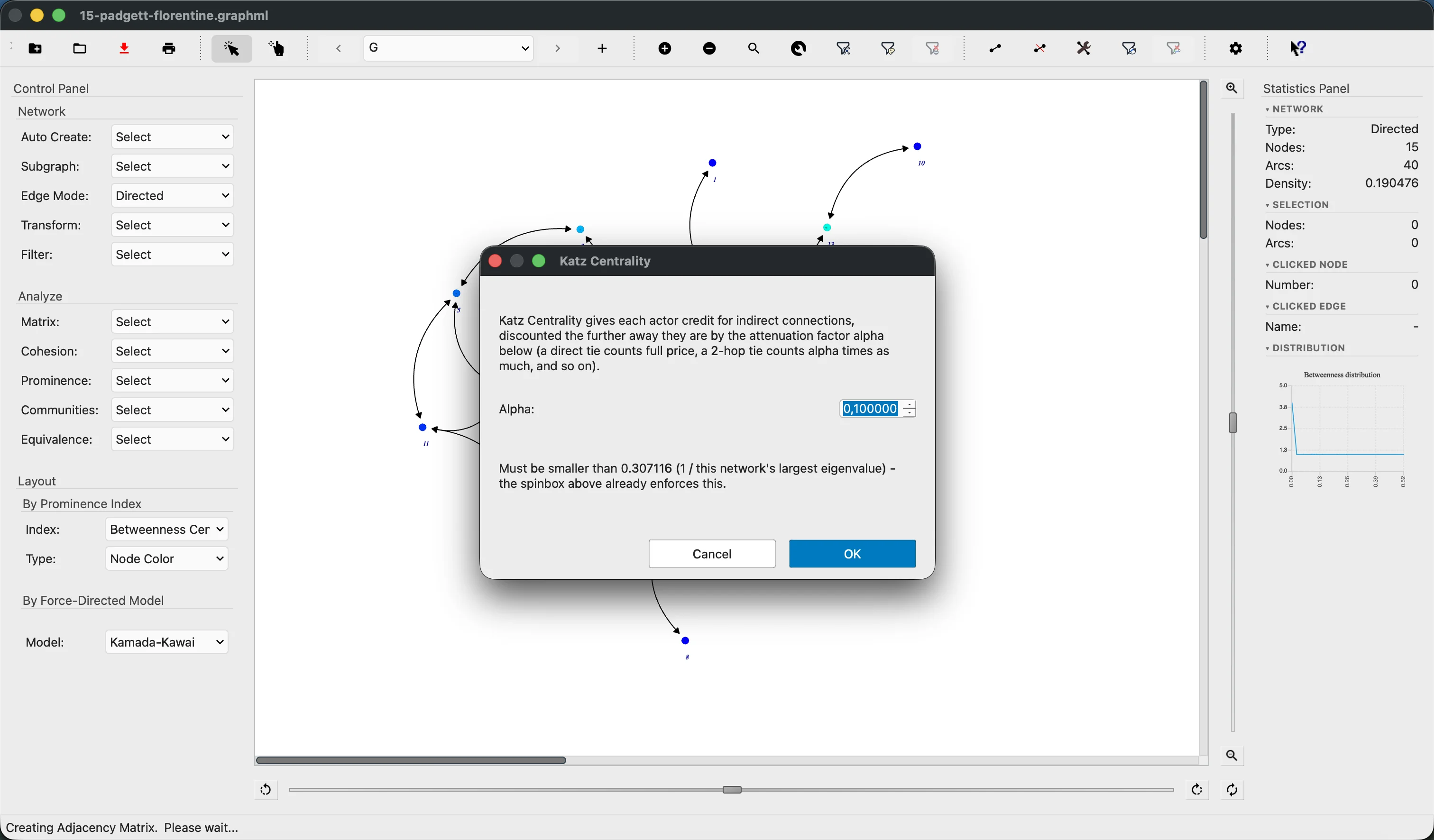
A new Analyze → Centrality → Katz Centrality measure gives each actor credit for indirect connections, not just direct ones — a friend-of-a-friend still counts, just discounted the further away they are, controlled by an attenuation factor alpha that you choose. It’s especially useful when ordinary Eigenvector Centrality collapses to zero on directed or disconnected networks. SocNetV estimates the valid range for alpha before showing the dialog and rejects values that wouldn’t converge — no guessing required. Full parity with every other prominence index: HTML/CSV reports, all four Layout → By Prominence Index variants, Filter Nodes by Centrality, Find Node by index score, and the prominence distribution chart.
⚖️ Bonacich Power Centrality (BPC)
A new Analyze → Centrality → Bonacich Power Centrality measure extends Katz with a second parameter, beta, that — unlike alpha — is allowed to be negative. This captures Bonacich’s signature idea: being tied to well-connected others doesn’t always help. In a bargaining or exchange network, being connected to powerful partners can actually reduce your own power, and BPC scores can come out negative to reflect that — a first among SocNetV’s centrality measures. Same full parity as Katz across reports, layouts, filtering, and charting.
🔗 Node and Graph Connectivity
Two new analyses under Analyze → Cohesion. Node Connectivity computes the minimum number of other nodes that must be removed to disconnect two chosen actors — a low number flags a structural vulnerability, a high number means many independent routes exist between them. Graph Connectivity answers the same question network-wide: the fewest nodes that would need to be removed to disconnect the network at its single weakest point. On directed networks, both let you choose whether to respect edge direction (strong) or ignore it (weak), matching the same choice already offered by Connectedness.
📊 Geodesic Distance Distribution
A new Analyze → Cohesion → Geodesic Distribution report answers “how many pairs of nodes are exactly d hops apart?” with a full distance-by-distance breakdown across the network. It reuses the all-pairs shortest-path cache from any prior distance or centrality computation, so it’s fast when that cache is already warm.
🧭 Shortest Path Reconstruction and Canvas Highlighting
Analyze → Cohesion → Distance no longer just reports a number — it now shows the full sequence of intermediate nodes along the shortest path (e.g. Alice → Carol → Bob), using BFS for unweighted networks and Dijkstra for weighted ones. The path’s edges are simultaneously selected on the canvas, exactly as if you’d Shift-clicked each one — letting you immediately move, inspect, or right-click the whole path without hunting for it visually.
🖼️ Viewport Auto-Fit
The canvas now automatically scales and centers to show the full network after every layout algorithm, after opening a file, and after generating a random network — and re-fits when the window is resized. No more “where did my network go?” after a layout or a window drag. Zoom buttons, Ctrl+scroll, and Reset (Ctrl+0) are reliable at any zoom level, and small networks are never scaled beyond 100%.
📤 CSV Export for Analysis Reports
A new Settings → Reports → Output format option (HTML/CSV) covers nearly every report in the Analyze menu — all matrix reports, every centrality and prestige index, reciprocity, eccentricity, clustering coefficient, and triad census. CSV is a lean, table-only alternative that opens directly in your spreadsheet app instead of the built-in report viewer. Clique Census and Hierarchical Clustering remain HTML-only, since both combine several heterogeneous sub-tables that don’t reduce to one flat table.
⌨️ Expanded CLI Scripting
The command-line interface gained a new --encoding flag (load a file with a specific text codec, bypassing the encoding-picker dialog) and --interactive-script mode, which drives SocNetV from a plain-text script — one command per line. Over twenty new script commands were added, covering relation switching, network generation, incremental graph building (add-node, add-edge, add-relation), and a headless report command for every centrality and prestige measure — letting the whole Analyze menu be scripted and benchmarked without clicking through the UI.
🌳 Faster Clique Census
The Bron–Kerbosch maximal-clique algorithm now uses Tomita et al.’s pivot-selection strategy, which can reduce the number of branches explored per recursive step to a single candidate on dense graphs — a dramatic speedup on real-world networks, with no change to the set of cliques reported.
⚡ The app no longer freezes during layouts and analysis
This is the headline fix of the release. Running a force-directed or prominence-index layout, or almost any weighted-centrality/distance report (Closeness, Betweenness, Stress, Power, Eccentricity, the distance and geodesics matrices, similarity/Pearson reports, and more), used to make the entire application completely unresponsive for the whole computation — no repainting, no input, not even a response to window-manager requests — on large networks or slower indices like Betweenness or Information Centrality.
The app now stays fully responsive throughout: a “please wait” status-bar message and busy cursor, plus a progress dialog with a Cancel button. Information Centrality, Eigenvector Centrality, and Walks Total — which sit outside the shared distance engine — got the same treatment separately.
Clearing a large network (loading a new file over one already open, or File → New) is also fixed: what used to take 30+ seconds on a 2,000-node/40,000-edge network now completes quickly, thanks to a bulk-teardown path and a fix for an accidental full-canvas repaint triggered by a combo-box state sync.
🛠 Other Improvements
- An eight-commit cleanup pass on the canvas rendering internals (
GraphicsWidget) improved both performance (single-probe hash lookups, merged selection queries, allocation-free edge keys) and correctness (fixed a double-free in guide-item cleanup, a dangling-pointer bug, Select All using the wrong coordinate space, and the rotation slider double-applying its transform).
- Canvas zoom now anchors to wherever you last panned, instead of jumping back to the network’s center.
- Auto-fit no longer over-shrinks networks that are only marginally larger than the canvas — it now matches the same tight, margin-free fit as Reset (Ctrl+0) in that case.
- Custom node images (Edit → Node → Change shape → Custom) with a non-square aspect ratio are now scaled proportionally and centered, instead of being stretched to fill the node.
- Misleading “session only” labels were removed from several preferences that were actually persisted between sessions.
🐛 Notable Bug Fixes
- Bezier curve edges are now correctly applied on startup — they previously always rendered as straight lines until toggled once in Settings.
- Removing one direction of a reciprocated edge no longer deletes both directions — it now always correctly downgrades to a single directed arc.
- Hierarchical Clustering Analysis now uses BFS on unweighted networks instead of always running Dijkstra, matching every other distance-based analysis.
- Erdős–Rényi random network generation now respects low edge probabilities (e.g. 0.01) instead of always producing zero edges.
- Singular (non-invertible) matrices are now correctly reported as such in the Inverse Adjacency Matrix report, instead of showing meaningless huge numbers.
- The canvas no longer silently falls back to slow software rendering — OpenGL is now enabled automatically, with a manual override still available in Settings → Canvas.
- The Statistics Panel edge count is now correct while a node filter is active, and stays correct after the filter is cleared.
- “Focus on Node” (Ego Network) now works correctly when applied to the very first node in a network.
- Several rare crashes on app quit were fixed, including a dangling-pointer double-free found via AddressSanitizer.
Download SocNetV v3.7 from our Downloads page and let us know what you think!
Happy analyzing!
— The SocNetV Team