Skip to content

News

SocNetV v1.7 Released with Lots of Goodies!

A new SocNetV release hit the road today. Version 1.7 solves a number of bugs and brings lots of interesting and useful new features to our users. Binaries for Windows, Mac, and Linux are already available on the project’s Downloads page. Here’s what’s new…

New Node Properties Dialog

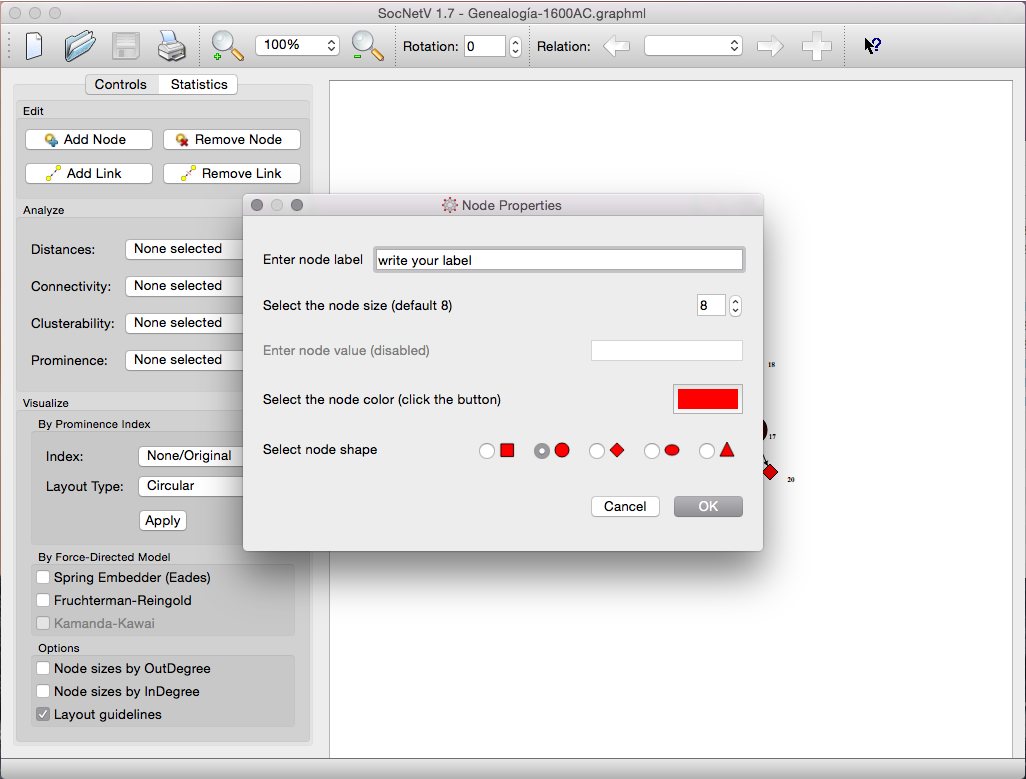
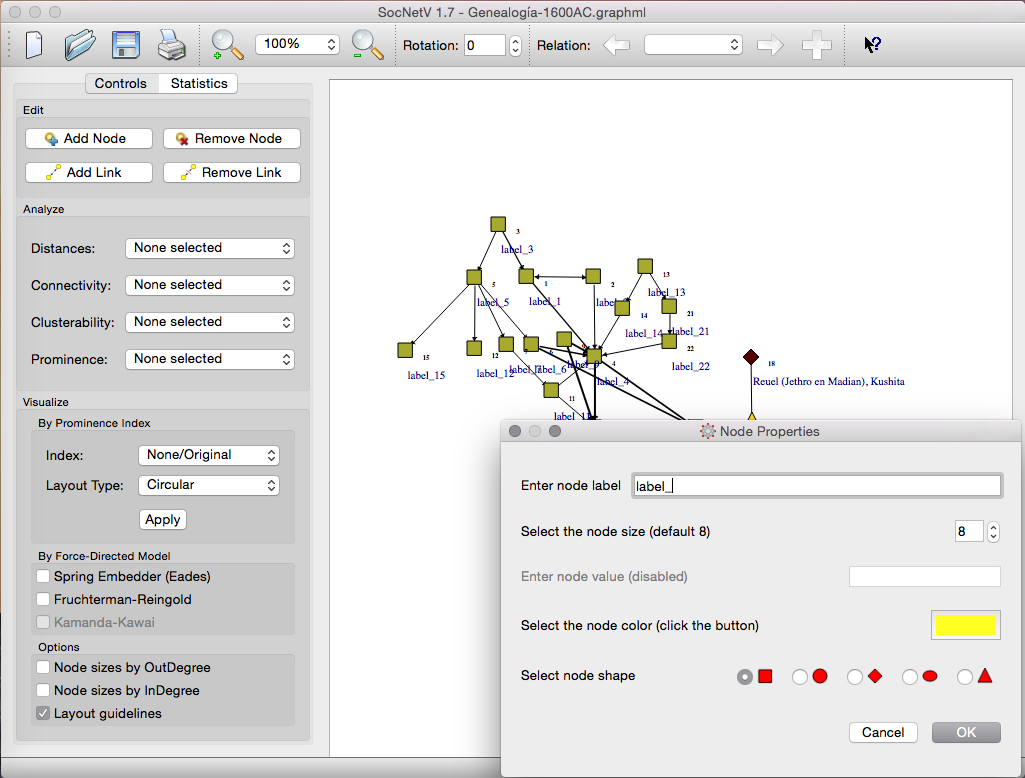
Up to now, editing a node required selecting each property individually (e.g., color, label). In version 1.7, a new Node Properties dialog consolidates all node editing options in one place. Simply right-click a node and select “Node Properties” (or press Ctrl+X, Ctrl+P).

Node Properties Dialog

In the Node Properties dialog, you can:

  • Enter a label.
  • Adjust the node size.
  • Edit the node color.
  • Choose a node shape (e.g., rectangle, circle).

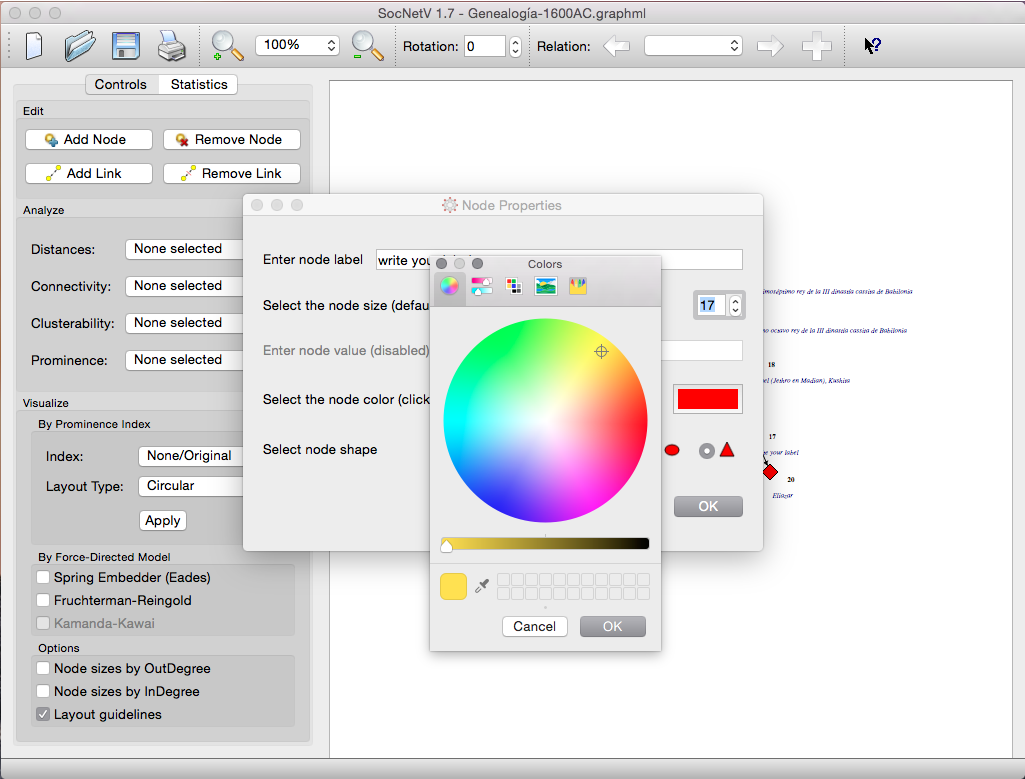
Changes are applied in one step and previewed live on the canvas. For instance, selecting the color button brings up a Colors dialog for easy color selection:

Colors Dialog


Group Node Editing

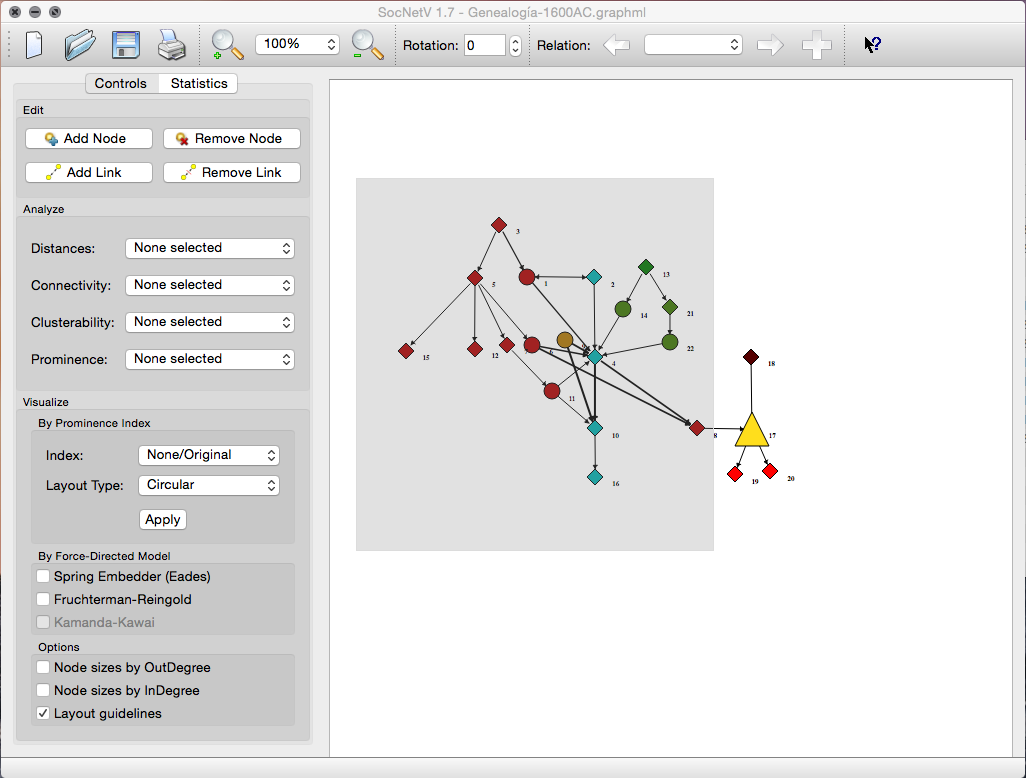
SocNetV v1.7 introduces the ability to select and edit multiple nodes simultaneously. Select nodes by left-clicking and dragging to draw a selection rectangle. Then, right-click on a selected node or the canvas to open the context menu and choose “Node Properties.”

Group Node Selection

The dialog is identical to the single Node Properties dialog, but changes apply to all selected nodes. If you label multiple nodes, SocNetV appends the node number to each label:

Group Node Labeling


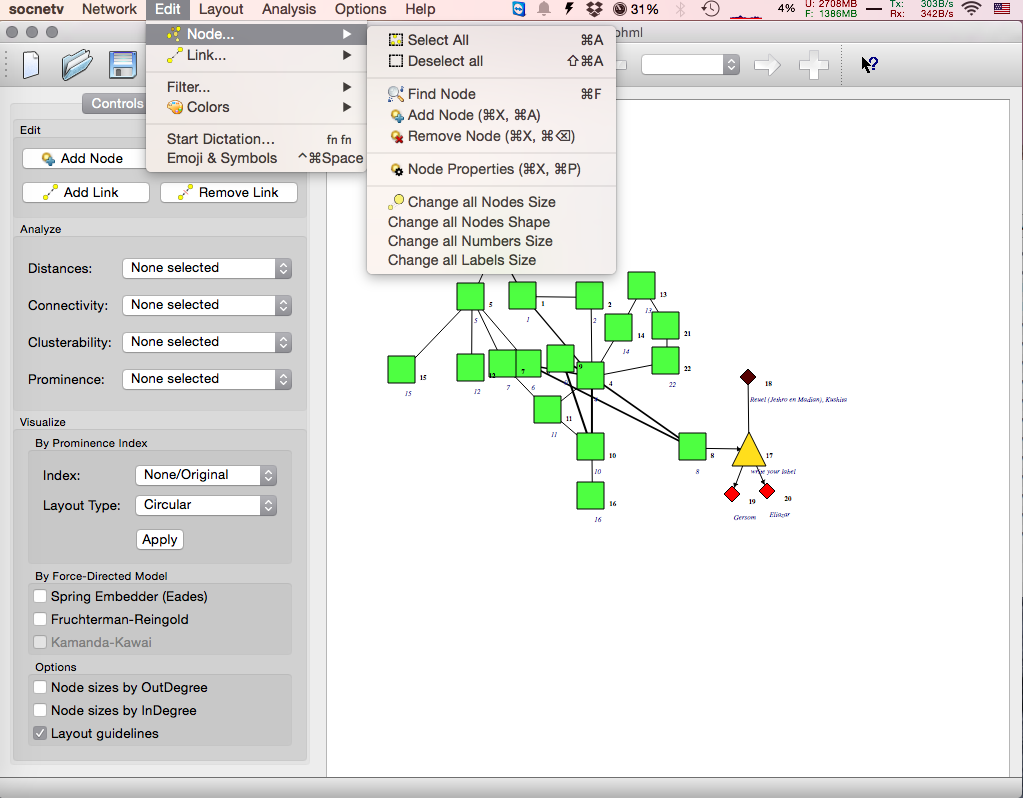
Select All and Select None

New shortcuts make it easier to select all nodes (Ctrl+A) or deselect all nodes (Ctrl+Shift+A).

Select All Shortcut


File Previewer

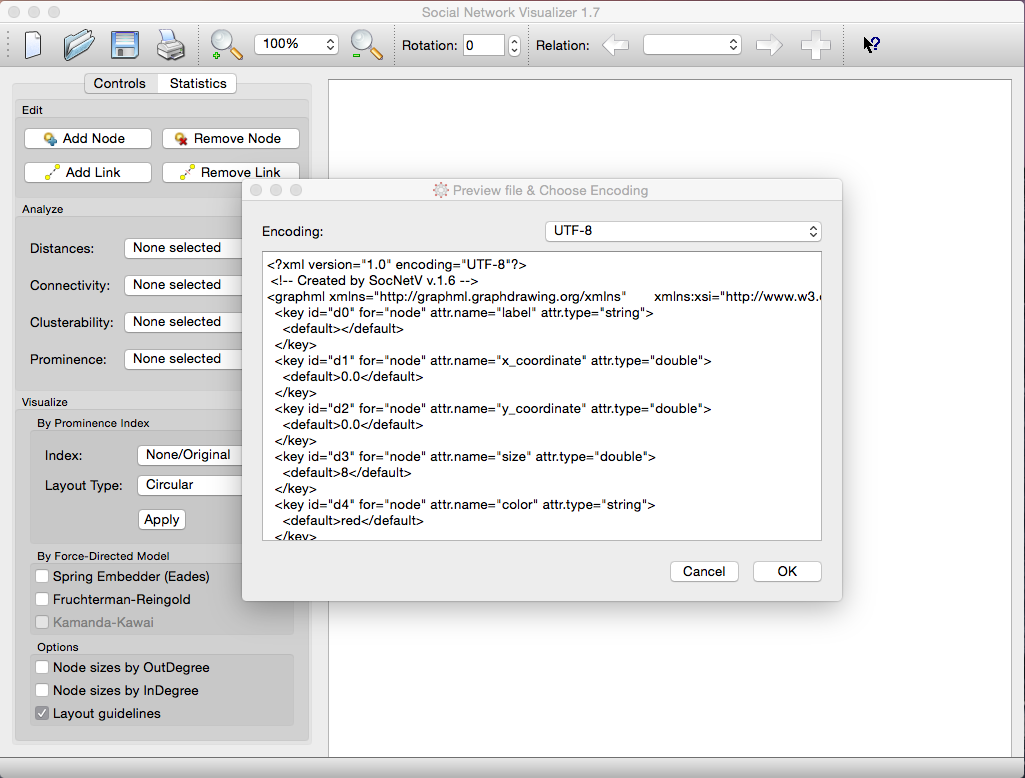
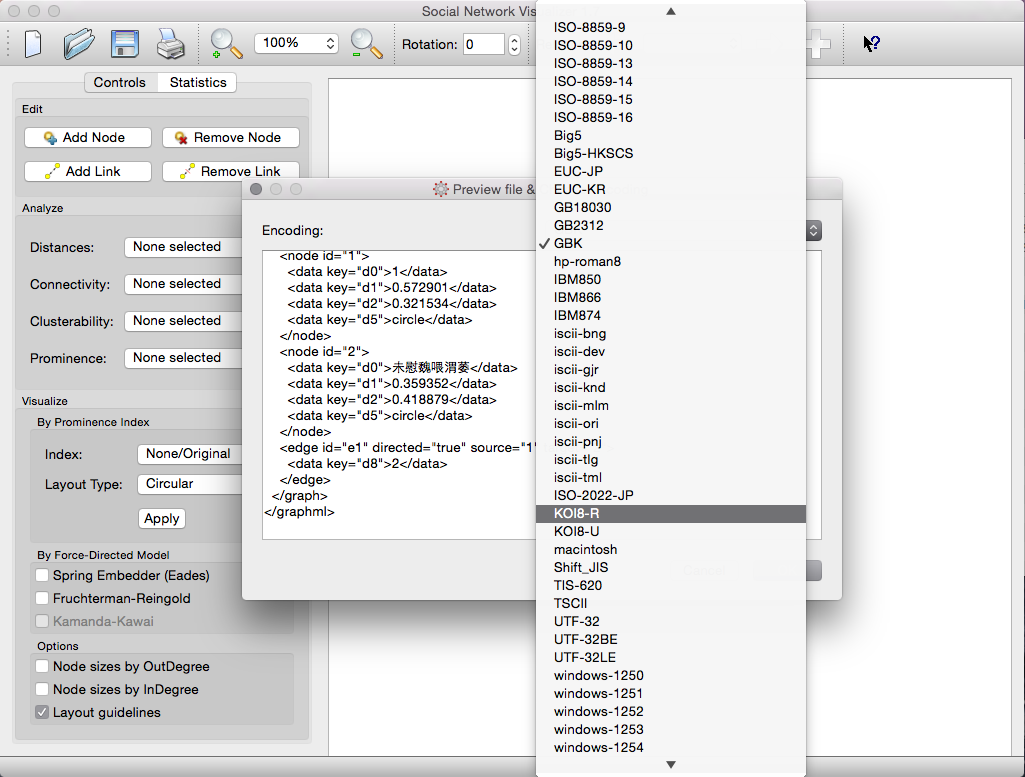
A major improvement in v1.7 is the introduction of a Network File Previewer, addressing issues with loading files saved in different codepages (e.g., non-Latin characters). The previewer allows users to select the correct encoding before loading the file.

File Previewer

With the File Previewer, users can:

  • Preview the file in various encodings.
  • Ensure proper display of all characters before loading.

Preview Encodings

Press “OK” to load the file and display the network on the canvas:

File Loaded

Notes on Encoding

  • Linux/Mac: Use UTF-8, except when loading files saved in Windows.
  • Windows: Use Windows-1253 for most cases or KOI8-R for Russian characters.
  • Default: SocNetV saves files in UTF-8 by default.

Bug Fixes and Changelog

SocNetV v1.7 resolves several bugs and introduces many improvements. For a full list of changes, visit the ChangeLog.

If you spot a bug, report it here. Feature requests are welcome on our blueprints listing.

Enjoy version 1.7!

SocNetV v1.6 Released with a Working Web Crawler

The SocNetV project has just released its latest version 1.6. Binaries for Windows, Mac OS X, and Linux are available from the Downloads menu.

Revamped Web Crawler

The new version brings back the web crawler feature, which had been disabled in the 1.x series so far.

To start the web crawler:

  • Go to Network -> Web Crawler or press Shift+C.

A dialog will appear where you:

  • Enter the initial web page (seed).
  • Set the maximum number of nodes/pages (default is 600).
  • Choose the types of links to crawl: internal, external, or both. By default, the crawler processes both.

Web Crawler Dialog


How It Works

The new web crawler is significantly improved compared to the 0.x releases. It consists of two components:

  1. Spider: Visits the specified initial URL, downloads its HTML, and processes it.
  2. Parser: Scans the downloaded HTML for href links to internal or external pages and adds them to a queue of URLs (the “frontier”).

The spider and parser run on separate threads, ensuring faster execution.

As URLs are added to the queue, the spider visits them, downloads their HTML, and the parser extracts more links, continuing the cycle.

Crawler in Action

The process is multithreaded and completes within seconds, even for large sets like 1,000 URLs.


Results

The crawler creates a network of all visited webpages as nodes and their links as edges. By default, node sizes are proportional to their outDegree, making patterns visible immediately.

Crawler Output

From there, you can analyze the network using the SNA tools provided by SocNetV.

Analyzing the Crawled Network

Note: The parser searches for href links only in the body section of the HTML.

Explore and analyze networks effortlessly with the enhanced capabilities of SocNetV v1.6!

SocNetV as "Intelligence" Source for Dolphin-Site Operators

Can you use SocNetV to analyze a virtual “social network”? Yes, you can! For instance, you could analyze social interactions (e.g., mentions) between “friends” in a virtual network. Although SocNetV cannot directly grab data from private networks (its built-in web crawler is limited to publicly accessible data), if you extract the network data yourself and transform it into GraphML format, SocNetV can load and visualize the virtual network for analysis.

This approach is particularly useful for platforms like Dolphin, an open-source platform for social networks, and its mobile-friendly sibling Trident. These platforms support social connections, conversations, locations, and other social graph-related data types, which can be analyzed using SocNetV based on operator needs.

Example Use Case

Imagine an airline company launches a social network for its clients. By using SocNetV to analyze connections, discussion trends, and user posts, the company could:

  • Identify which routes are in demand.
  • Plan and optimize scheduling based on social data.
  • Target specific user segments with special offers.
  • Advertise these offers directly within the social network.

This innovative application of SocNetV showcases its potential as an “intelligence” source for network operators, enabling data-driven decision-making and enhanced user engagement.

Kudos to the Dolphin and Trident teams for exploring this exciting use case for SocNetV!

SocNetV 1.5 Released

A new version of SocNetV has just been released! Version 1.5 brings standardization, many bug fixes, and exciting new features. Packages for Windows, Mac OS X, and Linux are available from the Downloads page.

Notable New Features

  • Prominence Scores on Valued Networks:

    • A new SSSP-solver algorithm (Dijkstra) enables prominence indices on weighted networks.
    • SocNetV asks whether to consider or invert weights, depending on their meaning (e.g., cost vs. votes).
  • Standardized Centrality and Prestige Scores:

    • Scores are now standardized (0.0 to 1.0) where applicable.
    • If no standardized formula exists, SocNetV normalizes by dividing the original score by the sum of all scores.
  • Prominence Layouts Relative to Highest Score:

    • Visualization layouts (circular, level, and nodal size) are now based on the highest score in the network rather than theoretical maximums.
  • Skip Isolates:

    • Option to omit isolates when computing prominence indices.
  • Graph Connectedness:

    • SocNetV reports if the network is connected or has isolates and suggests fixes.
  • CC Drops Isolates by Default:

    • Automatically drops isolate nodes to compute CC scores, avoiding user interruptions.
  • New Datasets:

    • Stephenson and Zelen (1989): Network of 40 AIDS patients.
    • Stephenson and Zelen (1989): IC test dataset (5 actors).
    • Wasserman and Faust: Star, circle, and line graphs (7 actors).

Bug Fixes

The following bugs have been resolved in this release:

  • #1358678: Fix GDC calculation in weighted networks.
  • #379558: Force-directed algorithms produce poor layouts.
  • #1365028: Methods isOutLinked & setOutLinked do not consider relations.
  • #1365504: centralityInformation() should symmetrize the adjacency matrix.
  • #1366625: Clicking on an edge does not select the correct edge.
  • #1369171: Group IC calculation yields incorrect results.
  • #1371208: Incorrect power centrality scores.
  • #1364955: vertices() should report only enabled vertices.
  • #1369336: Pagerank prestige reports incorrect scores.
  • #1370528: SocNetV cannot build on non-x86 architectures.
  • #1364320: Remove SRS PDF and fix spelling errors in code.
  • #1364361: SocNetV does not remember the last directory used by the user.
  • #1378346: Cannot change size and value of a node.

Enjoy the new features and improvements! If you spot any bugs, please report them here. Have fun!

A Short Tour of the New Features in SocNetV v1.4

Over the last weeks, the Social Networks Visualizer (SocNetV) project has released two new versions that bring useful features and bugfixes. The latest v1.4 closes even 4-year-old bugs!

SocNetV v1.4: Erdos-Random-Social-Network

Multirelational Editing

One of the strongest new features in SocNetV v1.4 is multirelational editing. Now, you can:

  1. Load or create a network (e.g., friendship ties in a classroom).
  2. Add a new relation (e.g., “likes”) using Ctrl+Shift+N or the + button.

SocNetV v1.4: Friendship Network
SocNetV v1.4: Classroom Social Network - Friendship

Easily switch between relations, analyze, and visualize them. For example, apply a circular layout based on Betweenness Centrality to one relation and compare it with another relation’s node size visualization.

Betweenness Centrality Visualization
Betweenness Centrality Visualization in a Circular Layout

Loading and Saving Multirelational Networks

  • SocNetV now supports loading multirelational networks (e.g., UCINET formatted files).
  • However, when saving, each relation must be saved individually. This will be improved in future versions.

For example, you can test this feature with the Freeman’s EIES networks dataset.

Freeman's EIES Networks
SocNetV v1.4: Freeman’s EIES Networks

Memory Optimizations

SocNetV v1.4 is optimized for low memory consumption and speed:

  • Handles networks with 1000 actors and 10,000 edges in seconds.
  • Consumes less than 400MB RAM.

Random Erdos-Renyi Network
Random Erdos-Renyi Network with 1000 actors and 40,000 edges.

Additional Enhancements

  • Improved visualization layouts (circular and nodal size based on prominence indices).
  • Faster analysis of large datasets with new tools like Triad Census and Geodesic Matrix.

Geodesic Matrix Analysis

Bugs Fixed

Version 1.4 addresses several bugs (see the ChangeLog) and introduces stability improvements. However, testing and feedback are always welcome to ensure the best user experience.


Download the latest version from the SocNetV Downloads page and enjoy exploring your networks!